India has a language barrier problem that technology is finally starting to fix. With 22 official languages and hundreds of regional dialects, getting anything done across state borders usually requires a working knowledge of English or Hindi. That leaves millions of people locked out of digital services and business opportunities. This Bhashini AI app guide will walk you through the government's official real-time voice translation tool. I tested the app across a few regional languages to see if it actually works better than what massive tech companies offer. It is genuinely useful for everyday communication and completely free for Indian citizens.
What is the Bhashini app?
The Ministry of Electronics and Information Technology built Bhashini to translate Indian languages in real time. You might have heard about the platform recently when Prime Minister Narendra Modi used it to translate his Hindi speech into Tamil during a live event in Uttar Pradesh. Many tech writers call it the UPI of languages. That is a heavy comparison, but the underlying goal is identical. Just like UPI made digital payments instant across different banks, Bhashini wants to make cross-language conversations instant across different states.
The platform supports all 22 official languages listed in the Indian Constitution. It handles text input and live voice translation. The government crowdsourced millions of voice samples from regular citizens to train this system. That makes the AI understand how people actually speak on the streets, rather than how a textbook says they should speak.
How to use Bhashini for real-time voice translation
Getting started is straightforward. The app is available on the Google Play Store and Apple App Store under the name "Bhashini". There are no premium tiers or hidden INR subscription fees to worry about. Here is exactly how to set it up for your daily tasks.
- Download the app and bypass the initial tutorial screens.
- Select your base language from the dropdown menu on the home screen.
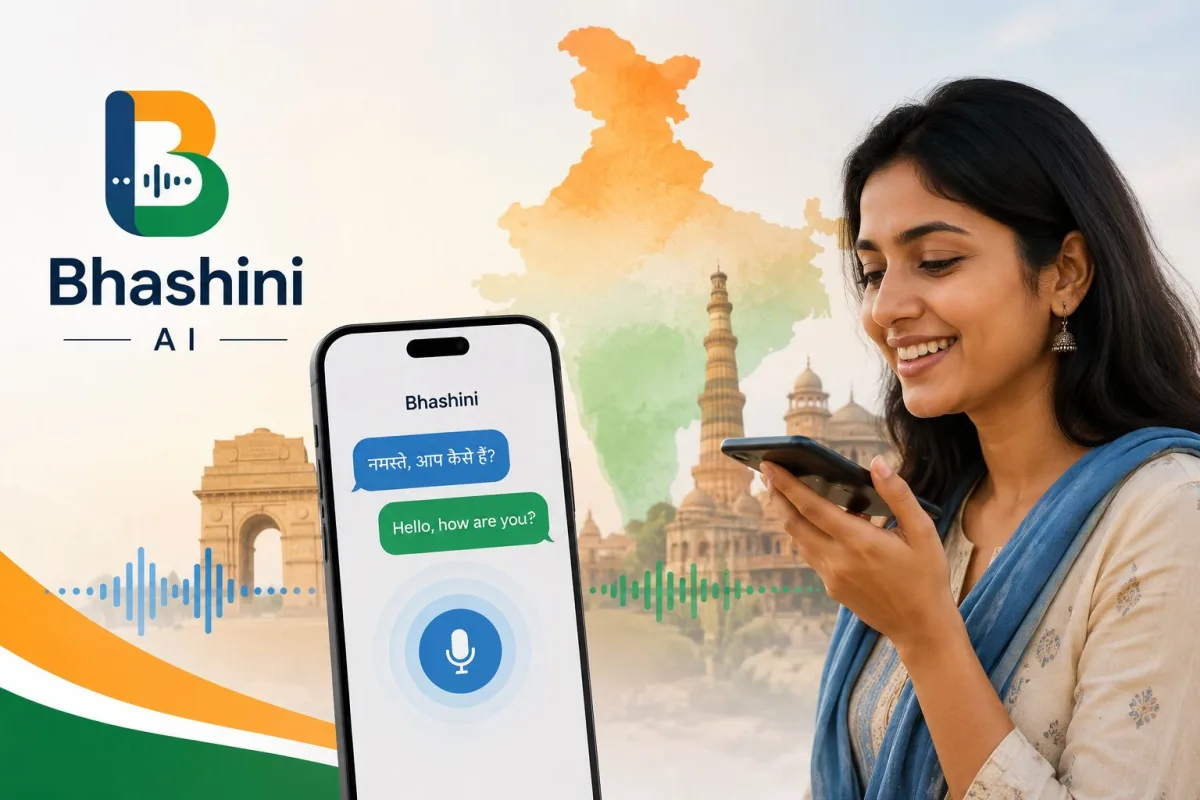
- Choose your translation mode. The bottom navigation bar offers Text, Voice, and Converse options.
- For live conversations, tap the Converse tab. You will see two microphone icons.
- Tap your language microphone, speak your sentence, and wait a second. The app will immediately speak the translated sentence out loud in the other person's language.
[Screenshot description: The Bhashini app conversation screen showing a split layout with Hindi on the top half and Malayalam on the bottom half, each with a large microphone button.]
The text mode is fairly standard, but the voice features are where the app actually proves its worth. You can also use the document translation feature to upload images of physical forms and printed letters.
Bhashini vs Google Translate for Indian languages
Google Translate is the default app for almost everyone. I put both tools side by side to see how they handle Indian dialects. Google often struggles with local context. It translates words literally. If you use a local idiom in Marathi, Google translates the exact words into English, which usually makes zero sense. Bhashini uses models trained heavily on Indian voices and localized text.
| Feature | Bhashini App | Google Translate |
|---|---|---|
| Local Dialect Accuracy | High. Understands casual street language better. | Moderate. Often sounds robotic and textbook-strict. |
| Speed | Can take 2 to 3 seconds to process voice. | Lightning fast. Almost instant. |
| Interface | Basic and slightly clunky. | Smooth, modern, and easy to navigate. |
| Cost | 100% Free. | Free for personal use. |
The reality is that Google has a better interface. It is faster. But Bhashini sounds more human when translating between two regional languages like Tamil and Bengali. If you want a deeper look at other AI platforms making waves in India, check out our AI tools directory.
Practical ways to use the Bhashini AI app daily
Who actually needs this technology? Politicians use it for live speeches, but regular people face language barriers in critical situations every single day.
Healthcare is the biggest area of impact. A doctor in Chennai can easily understand a migrant worker from Odisha using the real-time voice translation feature. Reports show that Bhashini recently integrated with national health platforms to boost accessibility for patients who cannot read English medical documents.
Small business owners also benefit directly. A shop owner in Mumbai's wholesale market can negotiate pricing with suppliers from West Bengal without needing a human middleman. You just place the phone on the counter, tap the microphone, and talk normally.
Students studying outside their home states use the document scanning feature to translate academic notes. Many educational materials are still heavily biased toward English. Bhashini helps students grasp complex subjects in their mother tongue first.
How Bhasha Daan powers the translation engine
To make an AI understand human speech, developers have to feed it millions of hours of audio. Finding high-quality audio data for languages like Bodo or Sindhi is incredibly difficult. The internet is mostly empty of these languages. The government solved this by launching Bhasha Daan.
Bhasha Daan is a crowdsourcing initiative where regular Indian citizens donate their voice. People log into a portal, read sentences displayed on the screen, and submit the audio. Others listen to these audio clips and verify if they are accurate. This means the Bhashini AI is trained on actual Indian voices with real local accents. If you are from rural Punjab, the AI understands your specific pronunciation because someone from your region probably contributed to the dataset.
Using Bhashini via WhatsApp bots
You do not always have to download the dedicated application. The Bhashini team has integrated their translation models into standard messaging apps. Several government departments now run WhatsApp chatbots powered by Bhashini AI.
A farmer in rural Maharashtra can send a voice note in Marathi to a government agriculture WhatsApp bot. The Bhashini AI processes the Marathi audio, translates it to English for the backend system to find the answer, translates the answer back to Marathi, and sends a localized voice note back to the farmer. This happens in seconds. The farmer gets the information without ever downloading a new app or learning a new interface. This invisible integration is where the real power of this technology lies.
Solving the AI English problem with VoicERA
The global AI industry has a massive language problem. Large language models were trained primarily on English data from the western internet. When you ask them questions in Telugu or Gujarati, they often hallucinate or give poorly constructed answers. Bhashini recently launched VoicERA to fix this.
The AI industry has an English problem. Open-source tools like VoicERA are essential to prevent a few foreign tech companies from controlling how the next billion internet users communicate.
VoicERA is an open-source multilingual voice AI stack. Developers can use the core Bhashini code to build their own software. If an Indian startup wants to add voice search in Kannada to their grocery delivery app, they do not have to pay massive API fees to foreign tech companies. They can integrate the VoicERA stack for free. This hardware and software independence is crucial for India. Open-source AI projects are starting to break the monopoly that big tech holds over artificial intelligence. We covered similar tech shifts in our recent AI explainers section.
Privacy and data usage concerns
When you speak into any translation app, you are sending your voice data to a remote server for processing. Bhashini operates under government-controlled servers within India. You still need to review the permissions you grant on your smartphone. The app asks for microphone and camera access. These are necessary for voice and document translation.
You should always be cautious about reading out sensitive information. Never speak your Aadhaar numbers or banking details into a translation tool. If you need to translate an SMS message from your bank, type the text manually instead of using the screen reader function. Scammers often trick people into downloading fake translation apps that steal financial data. Check out our scam prevention guides to understand how malicious apps operate.
Final thoughts on the platform
The Bhashini app has some rough edges. The user interface needs a complete redesign to match modern smartphone standards. The server response time needs to drop from a few seconds to instantaneous. But the underlying technology works surprisingly well for Indian languages. It gives millions of Indians access to information they previously could not read or hear. Download the app today and test it with a regional language you vaguely know. You will immediately notice the difference in how naturally it phrases sentences compared to western alternatives.