If you have a Provident Fund account, you need to check your phone right now. A massive Fake EPFO Employees Enrolment Campaign 2026 WhatsApp Scam is currently draining the retirement savings of salaried Indians across the country. And honestly, it's one of the most convincing frauds I've seen all year.
The criminals aren't making things up out of thin air this time. They're piggybacking on a real government initiative. The Employees' Provident Fund Organisation actually did launch the EEC-2026 scheme recently. But that scheme is meant strictly for employers to fix their payroll compliance. It has absolutely nothing to do with you as an individual employee.
Look, scammers know this sounds official enough to panic people into clicking links. The news is full of headlines about the campaign. So when you get a message about it, your brain registers it as legitimate. I want to explain what the scam is. I'll also show you how they get your money so quickly, and what you must do to protect your PF account today.
What exactly is this EPFO WhatsApp scam
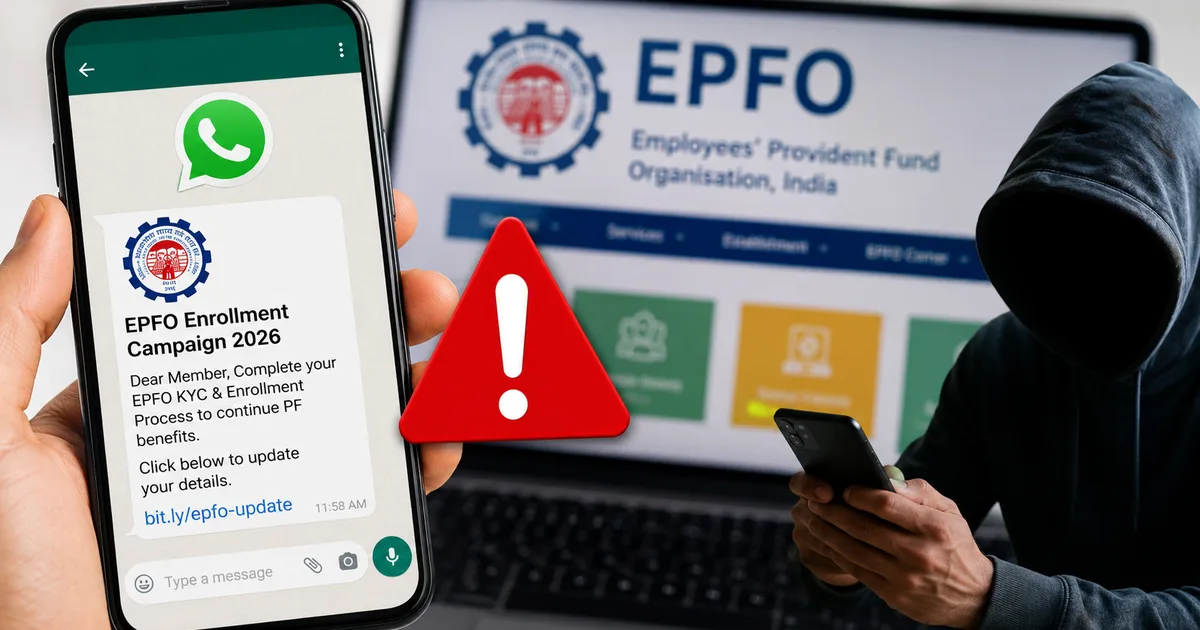
The premise is simple but dangerous. You get a message on WhatsApp claiming your EPF account is going to be frozen unless you complete your 'EEC-2026 mandatory verification.' It looks legitimate. The message usually has the official EPFO logo as its display picture, which makes it seem incredibly real. It threatens your savings. And if you ask me, that urgency is exactly why people fall for it.
Thing is, this is a targeted phishing attack designed for Indian internet users. The criminals are operating massive networks. They send out hundreds of thousands of these messages every single day. They want to scare you into making a quick mistake. And because everyone worries about their retirement funds, a lot of people are falling for the scam.
The entire goal is to get you to download a malicious file or hand over your Universal Account Number and password. Once they have that access, they wipe out years of your savings in minutes. You can read more about similar threats that target salaried workers in our fraud alerts section.
How the fraud works step by step
Understanding their playbook is your best defense. Scammers follow a script. When you know the script, they lose their power.
The initial contact
Your phone buzzes with a WhatsApp message from an unknown number. Strangely, it might even be a normal Indian mobile number starting with 9 or 8, not some weird international code. The text claims to be an 'Urgent Notice' from the regional EPFO office, which seems sketchy.
It says you've been selected for the Employees' Enrolment Campaign 2026. It claims you must update your Aadhaar link or verify your UAN details immediately. If you don't do this within 24 hours, the message warns that your PF account will be temporarily suspended. They also say massive penalty charges will apply to your balance.
The malicious link
Right below that scary warning is a web link. It might look something like 'epf-india-eec2026-update.com' or a shortened URL. The message tells you to click the link to download the official government verification app.
But this is completely fake. The real website for the organization is epfindia.gov.in. I think this is where most people get caught off guard. The scammers just buy domain names that look slightly official to trick people. The Supreme Court flagged several fake websites mimicking official government portals recently. But warnings alone can't stop the scams if people keep clicking the links.
The fake application
If you click that link, it downloads an APK file to your Android phone. An APK is just an Android installation package. (It's basically the Android equivalent of a .exe file on Windows). The file is usually named something innocent like 'EPFO_EEC_2026_Update.apk'.
When you try to open it, your phone warns you about installing apps from unknown sources. Modern Android phones have this protection built-in. But the scammers know this happens. Their WhatsApp message usually includes step-by-step instructions telling you to go to your settings and explicitly allow the installation. They tell you it's a 'secure internal government app' that isn't on the Play Store yet.
The data theft
Once you install this fake app, the trap springs shut. The app immediately asks for aggressive permissions. It wants to read your SMS messages, and it wants full access to your screen.
Then it shows you a fake login screen that looks exactly like the real Member e-Sewa portal. You type in your UAN and your password. Now the scammers have your login credentials.
But they also need a One Time Password to log in to the real portal. That's why the fake app asked for SMS permissions. It intercepts the OTP sent by the real EPFO system. Then it hides the notification from you and forwards it directly to the criminals. They log into your real account and change your registered bank details to a mule account they control. Then they initiate a massive withdrawal.
The truth about the real EEC-2026
The most devious part of this scam is how it twists real news. The Employees' Enrolment Campaign 2026 is an actual government initiative.
The real EEC-2026 is a compliance amnesty scheme exclusively for employers to update their payroll records. Individual employees have absolutely no role in this campaign and will never be asked to verify their identity for it.
Basically, this campaign is strictly a compliance scheme for companies. Employers are supposed to review their payroll and HR processes. The EPFO urged companies to use this amnesty period to enroll workers they might've missed in the past.
It's entirely a business-to-government transaction. Individual employees aren't supposed to download new apps or verify their identities on WhatsApp. I think people just read the headlines and panic. The scammers are banking on the fact that you saw a headline about EEC-2026 and assumed it applied to you directly. (the numbers here are a bit fuzzy, but millions saw those headlines)
Warning signs you should never ignore
You can spot this fraud early if you know what to look for. You just have to slow down. Look at the details.
- Unsolicited WhatsApp messages: The EPFO will never, ever send you unsolicited WhatsApp messages asking you to download an app. They just don't communicate that way. Any official communication happens through standard SMS from a verified sender ID.
- Fake web links: Look closely at the web links. Official Indian government websites almost always end in .gov.in or .nic.in. If a link in a message ends in .com or .org, it's definitely a fake site run by criminals.
- Extreme pressure tactics: Government departments move notoriously slowly. In my experience, government offices just don't move that fast. They don't give you strict 24-hour ultimatums on WhatsApp to update your KYC on a Sunday afternoon. That false sense of extreme urgency is a classic scammer trick.
- Misused compliance schemes: As mentioned, the real EEC-2026 scheme is for your employer. It's not for you. If you get a message telling you to do something as an individual for EEC-2026, it's a flat-out lie.
How to protect your retirement savings
You have to be proactive to keep your money safe. The government and your bank can only do so much to block bad actors. The final line of defense is your own common sense.
Don't click links in random messages. Ever. Even if the message looks like it came from your bank or the EPFO. Open your web browser. Type in the official website address yourself. Check our security guides for more deep dives on verifying official government portals.
Never install APK files sent over WhatsApp or downloaded from strange websites. If an app isn't on the Google Play Store or the Apple App Store, you shouldn't put it on your phone. If you ask me, that's the only way to be completely sure. Even official apps on the Play Store require caution. But sideloading an APK from a WhatsApp chat is basically handing the keys to your digital life to a stranger.
Keep your UAN password incredibly strong and unique. Don't use the same password you use for your streaming services. Your PF account holds a massive amount of money. Treat it with the exact same respect you treat your primary bank account. Use a mix of letters and numbers, and change it every few months.
If you legitimately need to check your PF balance or update your KYC details, use the official UMANG app. It's built by the government and secure. You can also log in directly at the unifiedportal-mem.epfindia.gov.in website using a secure laptop.
What to do if you clicked the link
Mistakes happen. Scammers are getting much better at tricking smart people. If you think you accidentally installed the fake app, you need to act fast. Minutes matter.
Immediately turn on airplane mode on your phone. Don't just turn off Wi-Fi. Airplane mode cuts off all cellular internet connections. This stops the fake app from sending any more of your intercepted SMS data or passwords back to the scammers.
Next, borrow someone else's phone or use your laptop. Go to the official EPFO portal and change your password right away. If you can't log in, the scammers might've already changed it to lock you out. In my experience, you need to call the official helpdesk immediately to freeze the account if that happens.
Then, you need to completely wipe that fake app off your compromised device. Go into your Android settings and uninstall it. Honestly, if you want to be completely safe, do a full factory reset of your phone. I know it's a mess to set everything up again (annoying, I know). But it guarantees the malware is gone forever.
You also need to check your primary bank accounts. Since these fake apps steal SMS data, they might've intercepted OTPs for your UPI apps like PhonePe or Google Pay. They can use this access to approve fraudulent UPI collect requests. Look for any unauthorized transactions. Call your bank to block your cards if you see anything weird.
Where to report the fraud
You must report this. Don't feel embarrassed or try to hide it. The more people report these specific crimes, the better chance authorities have of shutting down the networks. I'm not sure exactly why people hesitate to report, but doing so helps everyone.
Call the national cybercrime helpline at 1930 immediately. Keep this number saved in your phone contacts right now. It is the fastest way to report financial fraud in India and trigger the banking system to try and freeze stolen funds.
You should also file a detailed complaint on the official portal at cybercrime.gov.in. Take screenshots of the WhatsApp messages and the exact phone numbers they came from before you delete the chat. That digital evidence helps the police track them down.
You can also report the specific malicious links to CERT-In through their official channels on their website. They have the technical authority to analyze the malware and block these fake websites at the national telecom level. If you're looking for secure software alternatives to protect your devices in the future, browse our recommended privacy tools.