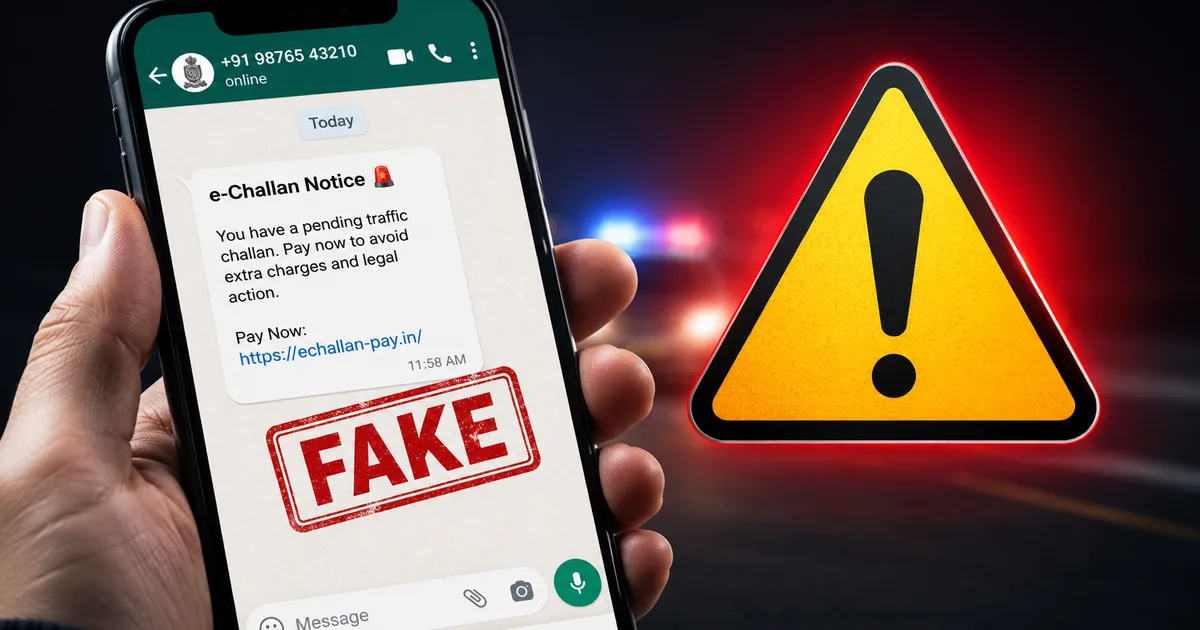
If you own a vehicle in India, there's a good chance you've already received one: a WhatsApp message claiming your vehicle has an unpaid traffic challan worth ₹500 to ₹1,500, with a link to "view details" or "pay now." The fake e-challan WhatsApp scam is one of the most aggressively spreading cyber frauds in India right now, and it's specifically designed to look legitimate on your Android phone. A woman in Delhi reportedly lost ₹6 lakh after clicking one such link. A man in Delhi lost ₹2,49,246.61 over what he thought was a ₹500 traffic fine. Delhi Police has issued formal warnings. Cyber police across states from Tripura to Maharashtra have reported a major spike in cases. This scam works. That's the uncomfortable truth.
What the fake e-challan scam actually is
This isn't your typical "click the link and enter your bank details" phishing attack. Honestly, it's more sophisticated than that, which is partly why it's catching so many people off guard.
The scam uses an APK file, basically a direct Android app installation package, disguised as an official government app. When you tap the link in WhatsApp, it doesn't take you to any government website. It downloads and installs a malicious app on your Android phone. Once it's installed, that app quietly requests permissions to access your contacts, SMS messages, call logs, and UPI apps. Sometimes WhatsApp itself too.
Cybersecurity firm CYFIRMA published a technical report on this specific campaign, calling it APK-based financial and identity theft. The malware can intercept OTPs sent by your bank. That's really all the fraudsters need to drain your account, without you doing anything more than tapping one link.
The message looks shockingly real. It often includes your actual vehicle registration number, which attackers can find through public data sources or leaked databases (I'm not sure exactly how these databases get out, but it's clearly not hard for them to get hold of this). It has a challan number and a fake fine amount, with a payment deadline. Some messages even use the official logo of the Ministry of Road Transport and Highways or the e-challan portal. And it arrives on WhatsApp, which feels more personal and trustworthy than email for most people.
How this scam works, step by step
- You receive a WhatsApp message claiming your vehicle (for example, "DL 01 AB 1234") has an unpaid RTO challan.
- The message includes a link designed to look official, something like "echallan-parivahan-gov.in" or a direct APK download link, pointing to a fraudulent domain.
- Tapping the link either opens a fake payment website or directly starts downloading a malicious APK file to your phone.
- If you allow installation, which Android prompts you to confirm when installing from unknown sources, the malware installs silently or disguises itself as a challan payment app.
- The app then requests permissions: SMS access, contacts, phone calls, and in advanced versions, accessibility services that let it read and interact with every other app on your phone.
- The malware monitors your SMS inbox for OTPs. When you open PhonePe, Google Pay, Paytm, or your banking app, it can capture your credentials. Some variants also harvest saved passwords from browsers.
- In documented cases reported by the Times of India, attackers then took over the victim's WhatsApp using intercepted OTPs, messaged the victim's contacts to spread the scam further, and simultaneously initiated UPI transactions from the victim's bank accounts.
The whole process, from one tap to full account drain, can happen in minutes. That's how someone loses ₹2.5 lakh before they've even understood what just happened.
Warning signs that a challan message is fake
There are clear tells. You just have to know what to look for.
- It arrived via WhatsApp or SMS from an unknown mobile number, not from a verified government sender ID. Legitimate traffic challan notifications in India come via SMS from sender IDs like EPVHCL or TRAOFF, not from random mobile numbers or foreign numbers starting with +92 or +1.
- The link ends in .apk, or the URL mixes words like "download" with "parivahan" or "echallan." The real e-challan portal is echallan.parivahan.gov.in and only that.
- The message creates urgency: "Pay within 24 hours or face legal action" or "Your driving license will be suspended." Government notices don't operate this way over WhatsApp.
- You're being asked to install an app to pay the fine. The actual government e-challan system works through browser-based payment on the official website, or through apps like mParivahan available on the Play Store, not through an APK sent over a chat app.
- The fine amount is suspiciously small, like ₹500 or ₹700. Small enough that you don't question it. Large enough to prompt immediate action.
Check before you click: You can verify any pending challan against your vehicle number directly at echallan.parivahan.gov.in. Type that URL yourself in your browser. Don't click a link from any message. Enter your vehicle registration number and you'll see everything. Takes two minutes and costs nothing.
How to protect yourself right now
Some of this is prevention. Some is damage control if you've already tapped something suspicious.
Never install APK files from links sent over WhatsApp or SMS. This is the single most important thing here. APKs from unknown sources bypass the Play Store's basic security scanning entirely, and there's no easy way for a non-technical person to check whether they're safe.
On your Android phone, go to Settings and look for "Install unknown apps" or "Unknown sources." Make sure no app has permission to install unknown apps, especially browsers and WhatsApp. This takes about 30 seconds and closes the most common attack vector in this scam.
Enable two-step verification on your WhatsApp (Settings > Account > Two-step verification). If attackers do intercept your OTP, they'll still need your six-digit PIN to take over your account.
If you've already tapped a suspicious link, here's what to do right now:
- Turn on airplane mode to cut internet access immediately.
- Don't open any banking or UPI apps on the affected phone until it's clean.
- Go to Settings > Apps and look for any recently installed app you don't recognize. Uninstall it.
- A factory reset is the safest option if you suspect malware is installed, especially if you granted the app accessibility permissions.
- Call your bank immediately to freeze your accounts. For UPI-linked accounts, inform NPCI through your bank's customer care helpline.
- Change passwords for your banking apps and email accounts on a different, clean device before using those services again.
Keep your Android updated too. Many of these malware variants exploit older security vulnerabilities that are already patched in recent Android versions. I know that's harder to do on older budget phones, and a lot of people in India are on devices that stopped getting security updates years ago. That's a real vulnerability, and these attackers are well aware of it. If your phone can update, update it.
You can also check our guide to scanning Android phones for suspicious apps or read our Android security checklist for Indian users for more detailed steps.
Where to report if you've been targeted
Report fast. For UPI fraud, speed is what matters most. The faster you report, the better the chance of blocking or reversing the transaction.
- Call 1930, the National Cybercrime Helpline, immediately if money has left your account. It's a 24/7 helpline specifically for financial cyber fraud.
- File a complaint at cybercrime.gov.in under the "Financial Frauds" section. Have your bank statement, screenshots of the WhatsApp message, and the APK filename ready before you start.
- Visit your local cyber cell at the district police headquarters. A written complaint creates a paper trail that matters if money needs to be recovered through courts.
- Report the malicious domain and APK to CERT-In at cert-in.org.in. They track active malware campaigns and can help get fraudulent domains flagged and taken down faster.
- In WhatsApp: open the chat from the scam sender, tap the three dots, select "Report." This flags the number to WhatsApp's security team for investigation.
If you can, screenshot the original message before deleting it. Note the sender's number and the APK filename if you saw it (these small details matter more than you'd think once an investigation starts).
Look, if you or someone you know clicked a link like this and lost money, it's not about being careless or naive. These messages are well-crafted. They often include your actual vehicle registration number, which makes them feel personal and real. The fake challan scam is part of a broader wave of government-impersonation frauds in India that keep getting more technically sophisticated year after year. Share this with anyone in your family who drives a vehicle, especially parents and older relatives who may not question a message that mentions their car number by name.
And while you're at it, check your DigiLocker and Aadhaar login history for any unknown sessions if your phone was compromised. These scams sometimes go further than just bank accounts.