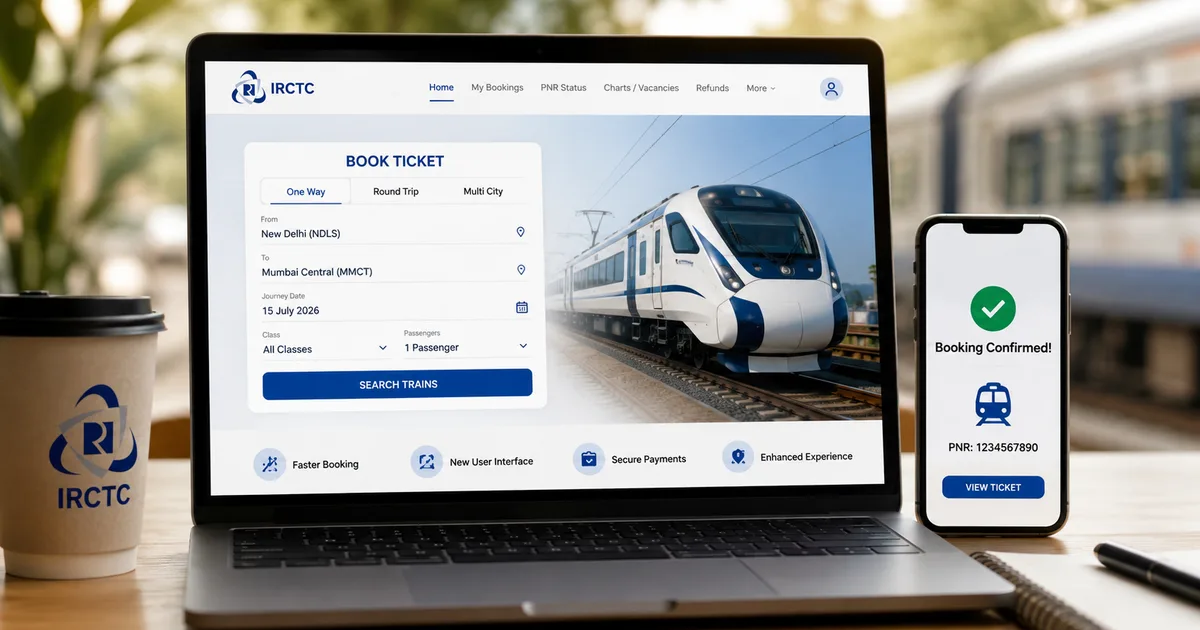
Look, we've all been there. It's 10:59 AM. Your fingers are hovering over the keyboard. You're logged into your account, praying to every god that the server doesn't log you out just as the Tatkal window opens. The tension is real. But things are finally changing. The IRCTC New Website 2026 launched today, July 15, and I've spent the morning digging through its beta version to see if it actually fixes our oldest problems.
Honestly, I was skeptical. We've heard promises of server upgrades before. But this time feels different (which makes sense, actually). The railways claim this revamped system can handle up to 1.5 lakh bookings per minute. That's a massive jump. They've basically rebuilt the engine under the hood. So if you're planning a trip home for Diwali or just need a quick weekend getaway, you need to know how to navigate this new layout.
I know adapting to a new interface can be hard when you're used to doing things on autopilot (annoying, I know). But I promise this one is worth learning. In my experience, taking five minutes to figure out the changes saves you hours of frustration later. Let's walk through exactly how to book your tickets faster, step by step.
What is actually new on the IRCTC portal?
Before we get into the clicking and typing, let's talk about what they actually changed. I hate when websites redesign just to look modern but end up hiding all the useful buttons. IRCTC has kept things familiar. But they smoothed out the edges.
First, the login is simpler. You'll notice fewer CAPTCHAs if you're a regular user logging in from a known device. That alone saves you maybe ten seconds. And ten seconds is a lifetime during Tatkal hours.
Second, they added a proper fare calendar. You don't have to click day by day to see when the ticket prices drop or when seats are actually available. It shows you a whole month at a glance. They also added easy seat selection. Yes, you can now get a better idea of where you'll sit before you pay. No more throwing a prayer into the void and ending up with a middle berth near the toilet.
And then there's AskDISHA 2.0. I'm not sure exactly why it took so long, but the AI assistant actually works now. You can literally talk to it or type a normal sentence to book a ticket or ask for a refund. It's wild to see a government portal implementing AI that doesn't just frustrate you.
Step-by-step guide to booking train tickets faster
Alright, let's get into the actual process. Assume you have zero technical knowledge. If you have an Indian phone number and a UPI app on your phone, you're good to go. Follow these exact steps to use the new system efficiently.
- Log in before you search: Open the new website. The login button is in the top right corner. Put in your username and password. You might get a simple math CAPTCHA, or none at all if the system recognizes you. [Image description: You will see a cleaner login popup without the old, messy distorted text boxes.]
- Enter your journey details: On the home screen, type your starting station and destination. The auto-suggest is way faster now. Type "NDLS" and New Delhi pops up instantly. Select your date.
- Use the new fare calendar (Optional but recommended): If your travel dates are flexible, click the small calendar icon next to the date field. This drops down a color-coded view showing seat availability across the whole week. Green means go. Red means waitlist.
- Hit search and filter smartly: Click the big orange search button. On the results page, the left sidebar is your best friend. Instead of scrolling past thirty passenger trains you will never take, immediately check the boxes for "AC 3 Tier" or "Vande Bharat" to filter out the noise.
- Check availability and click book: Find your train. You will see the availability right there. Click the "Book Now" button. The page transitions smoothly without that weird 5-second loading freeze we used to get.
- Fill passenger details fast: This is where people lose time. If you have saved your family details in your master list earlier, just check their names. If not, type the name, age, and gender. Indian users note: you can add your Aadhaar details here for faster verification, though it is not mandatory for regular bookings.
- Select your seat preference: Scroll down slightly. You now have a visual indicator for seat preferences. Choose Lower Berth if you need it, but remember it is still subject to availability.
- Choose the payment method: Scroll to the bottom. Choose "Pay through BHIM/UPI". It is infinitely faster than typing in debit card numbers and waiting for a bank OTP that arrives ten minutes late.
- Complete the payment: A QR code will appear on your screen. Just open Google Pay, PhonePe, or Paytm on your mobile. Scan the screen. Enter your PIN. Done. [Image description: A clean checkout screen with a prominent UPI QR code in the center.]
And that's it. Your ticket is booked. The confirmation page loads much quicker now. You get a WhatsApp message almost immediately with your PNR details. It's a huge relief.
Mastering the new Tatkal booking process
Tatkal is a different beast altogether. If you're reading this guide just to survive the 10:00 AM AC Tatkal rush, you need a specific strategy. The new website handles the load better. But human competition is still fierce. The numbers here are a bit fuzzy, but you're still fighting millions of people for a few seats.
"The upgraded platform will feature a simplified interface and process up to 1.5 lakh bookings per minute, reducing server congestion during peak hours."
Because the server doesn't crash as much, speed is entirely on your end now. Here's what you do.
Log in at 9:55 AM. Don't log in at 9:45 AM, or the system might time you out just when you need it. Search for your train. Keep the results page open. The moment your computer clock hits 10:00 AM, refresh the availability and click book.
You absolutely must have your passenger master list filled out beforehand. You can't waste twenty seconds typing out names during Tatkal. Select the saved passengers. Skip the seat preferences, because begging for a lower berth during Tatkal lowers your chances of getting a confirmed ticket at all. Just accept whatever they give you.
For payment, use the UPI QR code method I mentioned above. Have your phone unlocked. Keep the scanner app open before you even reach the payment page. Scan and pay in three seconds. If you hesitate, someone else gets the seat. It's brutal, but it works.
How AskDISHA 2.0 changes the game
I have to admit, I usually hate chatbots. They're usually just glorified FAQ menus that trap you in an endless loop. But the new AskDISHA 2.0 is genuinely surprising. It's powered by proper AI now. And it actually understands natural Indian English.
You'll see the AskDISHA icon floating at the bottom right of your screen. Click it. Instead of navigating the menus, you can just type a simple sentence. Try something like "Book a ticket from Mumbai to Pune for tomorrow morning." It'll parse that, find the trains, and present you with options right in the chat window. It walks you through the payment without you ever having to use the main search bar.
It's even better for cancellations. Finding the cancellation button in your booking history can sometimes be annoying. Now you can just tell AskDISHA to cancel your ticket with your PNR, and it processes it instantly. This is a massive win for older users or parents who get confused by a mess of complex website navigation. If you're setting this up for your parents, tell them to just talk to DISHA.
Avoiding common mistakes on the new portal
Even with a better website, things can go wrong. I've seen a few complaints from early beta testers. It's mostly because they're treating the new site like the old one. We cover a lot of these in our explainers section. But here are the immediate things to watch out for.
First, don't use the browser back button during payment. I know this sounds obvious, but the new site is faster. That means it processes your request in the background instantly. If you hit back while the UPI screen is loading, your money will get deducted from your bank. But the ticket will fail. You'll get a refund in three days, but your trip is ruined.
Second, beware of fake apps and websites. Every time IRCTC updates something, scammers push sketchy APKs on WhatsApp. They'll claim it's the "New IRCTC App 2026 for Fast Booking" or something similar. Don't fall for it. You can read more about avoiding these traps in our scam alerts. Always type irctc.co.in directly into your browser or use the official Rail Connect app from the Google Play Store or Apple App Store.
The verdict on the redesign
So, is the IRCTC New Website 2026 actually better? Yes. Honestly, it's a massive step up. The reduction in CAPTCHAs and the fare calendar make a huge difference. Booking a train ticket finally feels like a normal e-commerce transaction rather than a government exam.
They've finally realized that people just want to buy their tickets and leave. The integration of AskDISHA 2.0 shows they're actually trying to keep up with current tech trends. It's refreshing for a public utility service.
The beta is live now. They're rolling out full features through August. I suggest you go log in today just to get a feel for where the buttons are. Update your master list. Link your Aadhaar if you haven't. Do the prep work now so that the next time you need an emergency ticket, you aren't fumbling around looking for the search button.
Technology is supposed to make our lives easier. And for once, an Indian government portal actually delivered on that promise.