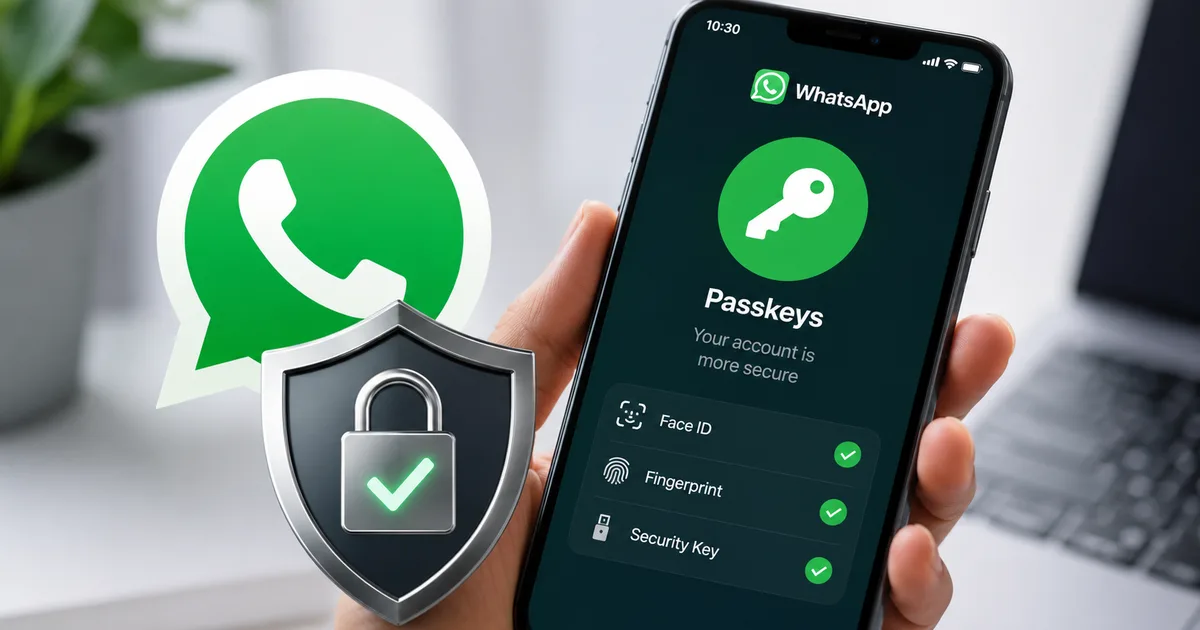
So you've probably seen the little prompt in WhatsApp asking you to set up a passkey. Most of us just hit "skip" because we're busy. But WhatsApp multiple passkeys support 2026 is actually rolling out to everyone in India right now, and it changes how you lock down your chats.
I know security settings are boring. I really do. But we can't trust simple SMS OTPs anymore. Scammers in India are getting dangerously good at intercepting text messages. Or they just pull off SIM swap frauds. They steal your number and log into your WhatsApp. Suddenly your relatives get a desperate message. They ask for a UPI transfer of 10,000 rupees. Honestly, it happens every single day.
Look, you don't need a cybersecurity degree to fix this. You just need two minutes.
How multiple passkeys actually work
We need to figure out what a passkey is first. It is basically a digital credential. And it lives right on your physical device. You don't have to remember a password. You don't have to wait for an SMS code. You just use your fingerprint. Or your face scan or screen lock. That proves you are you.
Apple and Google pushed this for a while. And now WhatsApp has it too. They added support for multiple passkeys across different devices.
Thing is, before this update you could only have one passkey. It was a total mess if you used a phone and a tablet. Or if you switched between an Android device and an iPhone (which is super annoying, I know). The new system fixes that. You can register different passkeys for different devices on the exact same account.
In my experience, this is the most useful feature they've added in years. Your account gets secured by the biometric hardware of whatever device you are holding.
Why standard two-step verification was failing Indian users
We relied on that standard six-digit PIN for years. It was better than nothing. But scammers adapted.
If someone tricks you into sharing your PIN on a call, your account is gone. They often pretend to be bank officials. Or they say they are telecom customer support and your KYC is expiring. SMS delivery in India is sketchy sometimes anyway. So people don't even question it. Someone says "can you read me the code you just got" and they just read it.
You can't read a passkey over the phone. And nobody can steal it in a phishing attack. It lives in your device's secure enclave.
"Passkeys are the strongest defense against account takeovers, moving us away from vulnerable SMS-based authentication methods."
So even if a scammer clones your SIM card, they are stuck. They can't log into your WhatsApp. They need your physical phone and your thumbprint too.
Step-by-step guide to enable multiple passkeys
Setting this up is super easy. I did it on my mother's phone last week. It took under a minute.
You do need a screen lock enabled on your phone first. If you don't have one, you can't use passkeys at all.
- Open WhatsApp and tap the three dots in the top right corner.
- Go to Settings, then tap Account.
- Select Passkeys from the menu.
- Tap Create a passkey.
- Your phone will ask you to confirm your screen lock or fingerprint. Do that.
That's it. You're done. The passkey goes to your Google Password Manager on Android. If you use an iPhone, it goes to iCloud Keychain.
Got a secondary phone linked to your account? Just repeat the process there. The system saves multiple passkeys now. You can log in on either phone without waiting for OTPs. You can read more about device linking in our detailed guides on the topic.
The rise of WhatsApp scams in India
You've probably read the news. People are losing lakhs of rupees to WhatsApp impersonation scams. A scammer gets access to an account. They read the chat history to see how the person talks. Then they start messaging contacts.
They usually ask for urgent help. "My UPI isn't working, can you send 5,000 rupees to this number for a medical emergency? I'll pay you back tomorrow."
People fall for it. The message comes from a familiar number, so the trust is already there. The numbers here are a bit fuzzy, but the Indian cybercrime portal says these scams have spiked massively. Scammers siphon off crores of rupees every single month.
It got so bad the government issued advisories. The Ministry of Home Affairs stepped in. If you get caught in one of these scams, report it to cybercrime.gov.in immediately. Or call the 1930 helpline. But prevention is better.
Setting up multiple passkeys shuts the door on this exact attack. The scammer can't get into your account. So they can't send those fake messages in the first place.
What about older smartphones?
I get asked this a lot. A lot of Indian users still use older budget phones. And those phones might not have the latest fingerprint sensors.
Here's the deal. If your phone runs Android 9 or later, you can use passkeys. Same for iOS 16 or later. You don't even need a biometric sensor. If your phone just has a basic PIN or pattern lock, the passkey uses that.
So maybe you use an older device you bought for 8,000 rupees three years ago. You can still use this update. It relies on the secure hardware element inside the phone's processor.
Comparing this to standard two-step verification
WhatsApp already has two-step verification. You know that six-digit PIN it randomly asks for when you open the app?
That feature is still there. You should definitely keep it on. But the passkey is for a different purpose.
The six-digit PIN is a second layer of defense. It proves you know a secret number. The passkey proves you actually have the physical device in your hand. When you combine both, you get phishing-resistant authentication.
Say a scammer builds a fake website. It looks exactly like the WhatsApp login page. They trick you into entering your six-digit PIN. They still can't log in. They need your physical phone to generate the passkey signature. That's why security researchers love this update so much.
Enterprise users and small businesses
If you run a small business in India, you probably use WhatsApp Business. Your catalog is uploaded. Your UPI payment links are ready. Your whole customer support operation runs on the app.
Losing access to a personal account is annoying. But losing a business account? That means losing money right away.
This multiple passkeys thing is a big deal for business accounts. You often have multiple people answering customer queries across different devices. Honestly, managing logins used to be a nightmare of sharing OTPs. Now you just register a passkey on your tablet. Put another on your main phone. Maybe a third on a desktop. You don't compromise the core security of the account.
If you do business on the platform, this is huge. Treat your WhatsApp Business account like your net banking.
The reality of account recovery
Things break. People leave phones in auto rickshaws. Or drop them in water. What happens to your WhatsApp when your only passkey is at the bottom of a lake?
This is exactly why multiple passkeys are great.
If you have a secondary device registered, you just use that one. Log in or authenticate a new phone easily. But maybe you lose your only phone. You aren't completely locked out. You can still fall back to the old SMS OTP method to recover your account.
The passkey replaces the SMS OTP for normal logins. But it doesn't permanently disable SMS recovery. So you still have a safety net.
You still need to be careful with your Google or Apple account. If someone hacks your Google account, they theoretically get access to your saved passkeys. So make sure your primary email is locked down with two-factor authentication.
Managing your connected devices
A lot of people forget where they are logged in. I'm guilty of this myself. You log into WhatsApp Web on a work computer. Then you just forget about it.
With the new update, you get a much clearer view of where your account is active right now.
Go to Settings and then Linked Devices. You will see a list of everywhere your account is signed in. See a device you don't recognize? Tap it and hit Log Out immediately.
The combination of biometric passkeys and regular device audits is powerful. It makes it nearly impossible for someone to hijack your account quietly (which is a relief). They would have to steal your phone. Then hack your fingerprint and bypass your screen lock.
We cover similar security practices in our technology explainers if you want to dig deeper into keeping your accounts safe.
A note on WhatsApp alternatives
Whenever WhatsApp changes its security policies, people talk about switching to Signal or Telegram.
Signal is more private. Telegram has better group features. But let's be real for a second. You can't switch to Signal if your mechanic is only on WhatsApp. Same goes for your kid's school teacher and your entire extended family. In India, WhatsApp is infrastructure. It is how business gets done.
So don't try to convince everyone you know to download a new app. It makes more sense to just secure the app you actually use.
The multiple passkeys update is rolling out right now. I'm not sure exactly why it takes so long for some users, but if you don't see it yet, check the Play Store or App Store. It might take a few days to reach every single device.
Take five minutes this weekend and set it up. It is the easiest way to make sure nobody else gets control of your messages. Also, you might want to check out our recent scam alerts to see what other tactics scammers are trying lately.