If you manage team updates or sales decks, you probably dread making presentation videos. Most editing apps feel either painfully complicated or painfully slow. That's why the Google Vids AI video generator caught my eye when Google began rolling it out to Indian Google Workspace users. It sits right inside your browser alongside Docs and Sheets. It turns rough ideas into working video clips without forcing you to learn timeline editing.
I spent Saturday testing it on an employee onboarding explainer. Honestly, it surprised me in a couple of places, and annoyed me in others. But in my experience, it solves a very real headache that office teams face every single Monday morning.
What Google Vids actually is
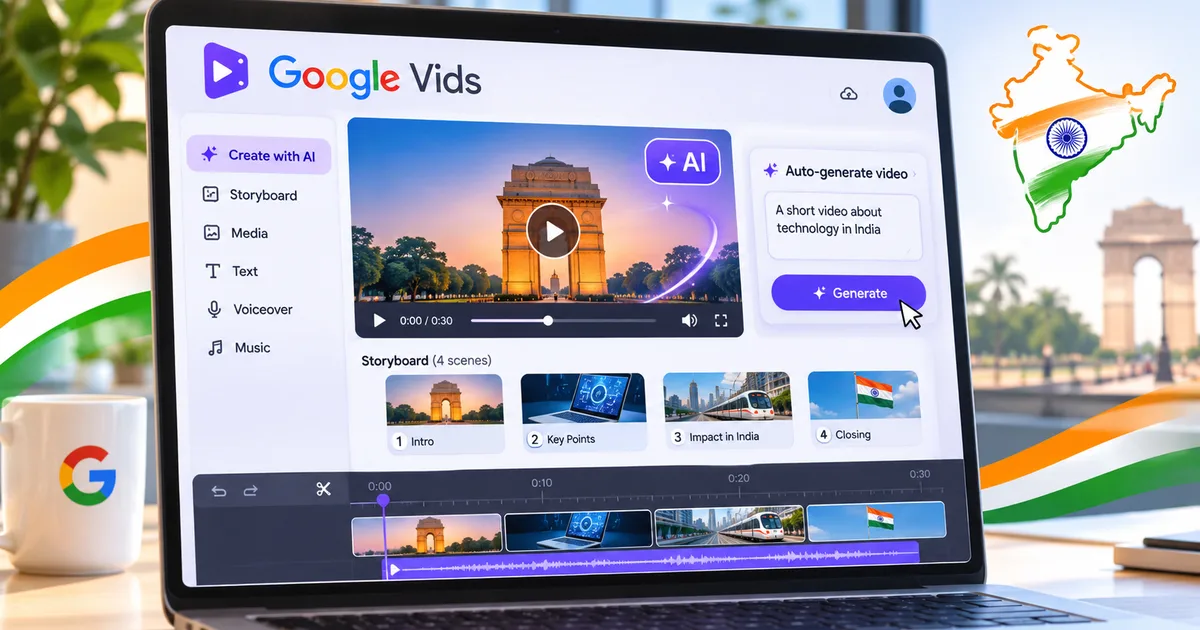
Google Vids is an AI video app built right into Google Workspace. Think of it as Google Slides meeting a simple video studio. You type a prompt. Then you pick files from your Google Drive, and Gemini drafts a storyboard. Each slide is a scene. You get stock footage along with an AI voiceover that reads your approved script. If you ask me, the whole workflow feels like building slides (which makes sense, actually).
You don't need a heavy graphics card. No expensive Mac needed, either. Everything runs inside Chrome, so even an entry-level laptop handles the rendering without breaking into a sweat. And if your office already pays for Gemini for Google Workspace or you have a personal Google One AI Premium subscription, the app shows up directly in your Google Drive menu under the New button.
Screenshot description: The Google Vids creation dashboard showing the Gemini prompt bar and Drive asset importer.
Google Vids India pricing and account eligibility
Let's talk money. Google's rollout strategy is a bit confusing for Indian users, if you ask me. I'm not sure exactly why Google made the tier rules so messy, but that's how it stands right now. Google Vids isn't available on regular free Gmail accounts. You can't just open a free personal account and spot it sitting next to Google Docs.
Access breaks down like this right now in India:
- Google Workspace commercial accounts with Gemini Business or Gemini Enterprise add-ons get full access. In India, the Gemini add-on starts around ₹1,660 per user per month before 18% GST.
- Individual professionals can subscribe to the Google One AI Premium plan for ₹1,950 per month, which includes Gemini Advanced models and Google Vids rollout access alongside 2TB of cloud storage.
- Workspace education tiers have begun receiving access for staff, though student availability depends on administrator settings.
Look, for a small business in Surat or Bengaluru, ₹1,660 per seat each month is a serious expense. It really is. A five-person team ends up paying around ₹9,800 monthly once taxes kick in. But if your team already pays for Workspace and wastes hours fighting clunky desktop video editors, the math starts making sense.
Google Vids does not train customer Workspace video data on public Gemini models without explicit organization permission, following standard Google Workspace commercial data protection agreements.
How Google Workspace AI video features work in practice
The main tool inside Google Vids is called Help me create a video. You click it, and a prompt box opens up. Type what you want to explain. For example: "Create a 60-second video welcoming new remote marketing interns and explaining company communication guidelines."
Then comes the neat part. You can attach Docs or Sheets directly from your Google Drive (which takes seconds). Gemini reads through them and maps out a sequence of scenes. It writes the voiceover script for each scene, and it pairs each card with stock clips from Google's library. It adds background music, too.
There is also a handy feature called Read along. When you pick an AI voice, Google Vids highlights words in real time as the automated narrator speaks. That makes it easier for viewers to follow complex training materials without getting lost.
And if you prefer your own voice, you don't have to rely on synthetic speech. You can record yourself talking directly through your webcam or microphone. The app automatically lines up your audio with the cards on screen. In my experience, this saves a lot of time compared to recording voice clips in a separate app.
Screenshot description: The storyboard timeline view displaying individual video cards with editable voiceover script boxes underneath.
Step-by-step walkthrough: how to create videos with Google Vids
Making your first clip takes around ten minutes once you get the hang of the interface. Follow this walkthrough step by step:
- Open Google Drive, click the New button in the top-left corner, and select Google Vids from the menu.
- In the prompt box, describe your video goal and paste references to any Docs or Sheets you want Gemini to pull facts from.
- Review the generated storyboard outline. Gemini breaks your concept into individual cards with suggested titles and timings. You can reorder, delete, or add scenes right here.
- Choose your visual style. Google gives you several design templates with preset fonts, color palettes, and transition effects.
- Review the script and stock footage. Click on any scene to swap out background videos or edit the voiceover text in plain English.
- Select your voiceover. You can pick from multiple AI voice profiles, including English with an Indian accent, or record your own narration.
- Click Share to send a link to teammates or download the final result as a 1080p MP4 file.
Screenshot description: The export window showing 1080p MP4 download settings and Google Drive permission sharing toggles.
If you like experimenting with new creative tools, check our AI tools and software directory for more automation options. We also maintain a library of hands-on how-to tech guides covering everyday productivity tricks. Honestly, tying a couple of these tools together saves hours of grunt work every week.
Google Vids compared to alternative video editors
Google Vids doesn't try to compete with Adobe Premiere Pro or DaVinci Resolve. It is built for workplace communication, where quick turnarounds matter far more than cinematic polish. Still, Indian teams have plenty of solid alternatives like Canva and Clipchamp.
Here is how the three options stack up side by side:
| Tool | Best For | India Pricing (INR) | Strengths | Weaknesses |
|---|---|---|---|---|
| Google Vids | Workplace explainers and internal presentations | Gemini Workspace add-on (~₹1,660/user/month) or Google One AI Premium (₹1,950/month) | Direct Drive and Docs integration, clean timeline, decent Indian English voice presets | No advanced timeline slicing, basic transition effects, requires paid Gemini tier |
| Canva Dream Lab | Social media promos, posters, and marketing clips | Free tier available; Pro costs ₹499/month or ₹3,999/year | Huge template library, quick social aspect ratios, rich animation catalog | AI video generation credits run out quickly, fewer deep enterprise doc integrations |
| Microsoft Clipchamp | Quick video cutting, screen recordings, YouTube vlog trims | Free tier included in Windows 11; Premium at ₹929/month | Handy desktop webcam recorder, smooth local timeline scrubbing, easy auto-captions | AI storyboard generation is minimal, feels more like a conventional editor than a prompt builder |
If your main focus is making promotional reels or Instagram clips, Canva is still the better choice. You can read our detailed breakdown of Canva Dream Lab AI features and India pricing to see how its generative credits work. But for company explainers pulling data straight from Drive spreadsheets, Google Vids is much faster. In my experience, skipping the file export step alone saves a ton of hassle.
Honest limitations you should expect
Let's be blunt about what Google Vids can't do. I think this is where expectations need a quick reality check. First off, this isn't an open-ended cinematic generator like Sora or Runway Gen-3. It doesn't generate hyper-realistic fantasy scenes from thin air. Basically, it stitches together stock clips and text overlays based on your script.
Second, the editing timeline is rigid. Very rigid. If you want frame-by-frame cutting or multi-track audio mixing, you'll hit a wall within two minutes. You can't slice an audio track halfway through a sentence, nor can you apply custom LUT filters (annoying, I know).
Third, regional Indian language support is still limited, and the rollout dates for regional voices are a bit fuzzy. While the AI voiceover library has English with an Indian accent, support for Hindi, Tamil, Telugu, and Bengali voiceovers is either inconsistent or absent in early builds. For an Indian business that communicates with customers across regional languages, this is an obvious gap. Google has promised deeper multilingual voice options as part of its broader Google Gemini AI 2026 update, but right now, English is the only reliable choice.
Finally, there's no standalone smartphone app. You can view finished Vids on mobile through Drive, sure. But building or editing projects requires a desktop browser.
Should you pay for Google Vids in India?
If your company already pays for Google Workspace with Gemini, start using Google Vids tomorrow. Seriously. It cuts down the hours spent turning dry policy documents into watchable team updates. HR teams and project leads will get plenty of mileage out of it.
On the other hand, if you're a freelancer or college student on a tight budget, paying ₹1,950 every month for Google One AI Premium just for Vids makes little sense. Free tools like Clipchamp on Windows or Canva's free plan handle basic presentations without an ongoing subscription.
Thing is, Google Vids is just a practical shortcut. It won't turn anyone into a Bollywood editor. But it will save you from having to deliver another boring forty-slide deck on Monday morning.