Meta AI Studio 2026 is finally here for Indian creators. And honestly, it is about time we got a straightforward way to build custom WhatsApp bots without needing a computer science degree. I tried setting this up last weekend, and the process is surprisingly simple. You don't need to know how to code. You just need a clear idea of what you want your bot to do. Whether you are running a small baking business from your home in Pune or managing a huge Instagram meme page, having a bot answer your DMs saves hours of typing the same replies over and over.
What is Meta AI Studio exactly?
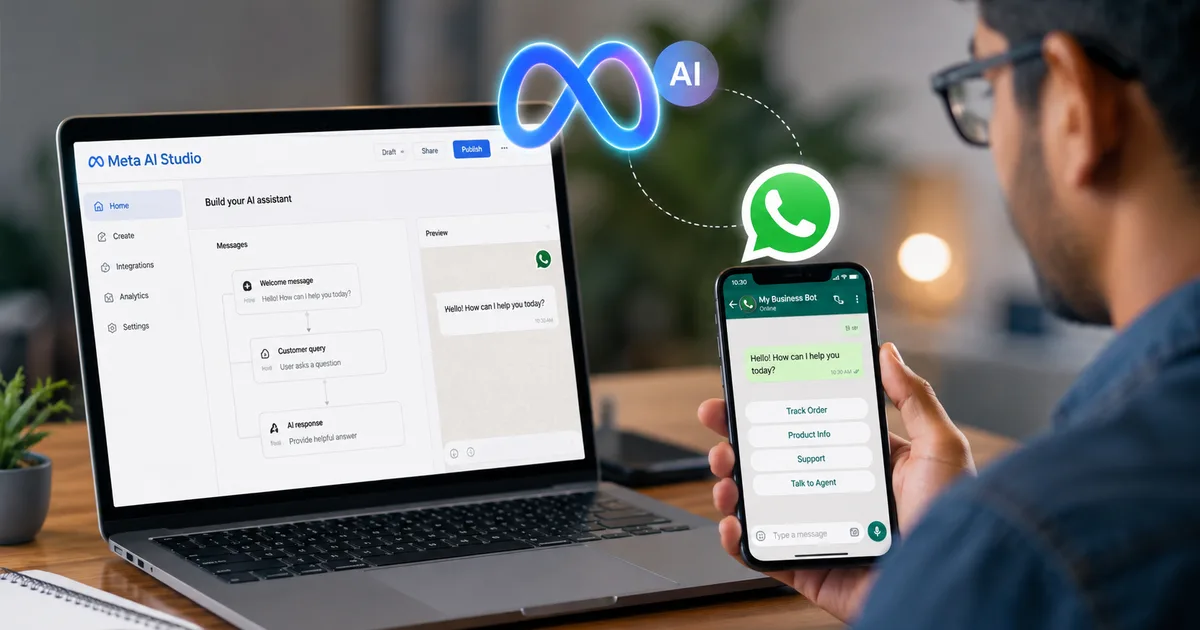
People keep asking me if this is just another expensive enterprise tool. It's not. Meta recently launched AI Studio globally. They made their custom AI tools available to everyday users. And yes, it works directly inside WhatsApp and Instagram. This means you can train an AI version of yourself to handle basic queries. Like telling people your UPI ID or explaining your pricing in Hindi.
I've spoken to dozens of local business owners in Delhi and Mumbai over the past month. The common complaint is always about managing messages. Meta AI Studio 2026 solves a very specific, very irritating problem. You get hundreds of people asking the exact same questions. "Are you open today?" or "Do you deliver to Andheri?" You sit there copying and pasting replies. It drains your energy. This new studio gives you a way to automate all of that without paying thousands of rupees to a developer. Meta has basically taken the complex AI tech and put a simple user interface on top of it. You type what you want. The AI figures out how to say it to your customers.
The real costs for Indian users
Let's talk about the money aspect. Because for any small Indian business, cost is the deciding factor. Traditional WhatsApp Business API providers charge a monthly fee, plus a per-conversation fee. It adds up fast. If you get 500 inquiries a month, you could be spending anywhere from ₹2000 to ₹5000 just on the bot software.
Meta AI Studio bypasses those third-party fees. You're dealing directly with Meta. Creating the bot is free right now. Meta wants everyone on the platform to use this. But I'm not sure exactly why they haven't announced pricing, or how long the free tier will last. Right now, small creators can handle hundreds of messages a day without paying a single rupee. If you run a big store with thousands of daily queries, you might eventually hit a limit. The numbers here are a bit fuzzy. Compared to older API setups, this is a huge win for Indian freelancers and small business owners. You can literally start saving money today if you cancel your old bot subscription.
How to set up your first custom WhatsApp bot
Let's get into the actual steps. I built a simple bot that gives out my freelance writing rates. It took me around twenty minutes.
Step 1: Accessing the studio
First, you need to open the Meta AI Studio on your desktop. You can log in using your Instagram or Facebook account. It asks for basic permissions. Just click through those.
Step 2: Defining your bot's personality
This is the fun part. You literally just type out how you want the bot to talk. I told mine to be polite, use a bit of Hinglish, and never give discounts. Be specific here. Tell it exactly what to say when someone asks for a discount. Tell it how to share your payment links.
Step 3: Feeding it your information
You can upload PDF files or just type out your FAQs. If you have a menu for your cloud kitchen, upload the PDF. The bot reads it and uses that data to answer questions. I uploaded a simple text file with my pricing and links to my previous guides. It understood everything instantly.
Step 4: Testing and publishing
Before you make it live on WhatsApp, you get a chat window to test it. Ask it the weirdest questions you can think of. If it gives a bad answer, you can go back and tweak the instructions. Once you're happy, hit publish. It connects to your business number automatically.
What Meta AI Studio cannot do
Honestly, this thing isn't perfect. It will make mistakes. It can't process complex payments on its own yet, though you can still share your UPI QR code (which makes sense, actually). It also struggles sometimes with very complex, multi-part questions in regional Indian languages. If someone types a mix of Tamil and emojis, the bot might just give a generic error message. You still need to check your messages occasionally to make sure it hasn't gone completely off script.
Look at a real-world example of where it fails. I tried to make my bot understand a complex return policy that involved different conditions for different products. If a customer buys electronics, they have 7 days. If they buy clothes, they have 14 days. The bot got confused. When a user asked a vague question about returns, the bot gave the wrong timeframe. You have to write your instructions very, very clearly. Treat the AI like a bright but easily confused intern. Keep your rules simple. If your business logic is too complicated, the bot will mess it up and anger your customers. That's a guaranteed way to lose a sale.
The underlying tech and Muse Glimmer
For the tech nerds reading this, Meta is actually running some impressive models in the background. They recently announced the Muse Glimmer AI model. The interesting part about Muse Glimmer is that it can run locally on consumer hardware. While your WhatsApp bot runs on Meta's servers, the fact that they're building models small enough for regular devices means this tech is getting much cheaper to run. That's probably why they can offer it for free to small businesses right now.
Is it safe for your business data?
Privacy is always a concern when you feed your business data to a huge tech company. Meta says they use your interactions to train their models unless you opt out. I think you should dig into the settings and opt out of data sharing if you're uploading sensitive customer information. If you're just uploading a restaurant menu, it doesn't really matter. But if you're sharing private client contracts, be careful. Always check out our scam alerts to see how data leaks can affect you.
Why you should probably build one today
Look, if you get more than ten DMs a day asking for the price, you're wasting your time. A bot handles that instantly. It replies at 2 AM when you're asleep. It never gets annoyed. Indian consumers expect instant replies on WhatsApp now. If you take three hours to reply to a message, they'll just message your competitor.
And there's another aspect to this. Professionalism. When a customer messages you and gets an instant, polite, grammatically correct response, it makes your business look bigger and more established than it might actually be. You could be working out of your bedroom in Bangalore, but to the customer, you have a dedicated customer service rep. That builds trust. In the Indian market, where trust is everything when buying online, that instant professional reply is golden. I've seen businesses double their conversion rates simply because they replied within thirty seconds instead of thirty minutes.
Comparing it to older bot platforms
Before this, if you wanted a WhatsApp bot, you had to use third-party services.
| Feature | Meta AI Studio | Traditional Bot Builders |
|---|---|---|
| Cost | Free (currently) | ₹1500 - ₹5000/month |
| Setup Difficulty | Very Easy | Needs some technical knowledge |
| AI Intelligence | High (Understands context) | Low (Button-based mostly) |
| WhatsApp Integration | Native | Requires API approval |
The difference is night and day. Traditional bots made users click numbers to get answers. "Press 1 for Sales." Nobody likes that. The Meta AI Studio bot actually talks to your customers like a normal person.
A quick tip for students and freelancers
Even if you don't sell products, building a bot is a great way to filter your messages. I know freelance designers who use it just to ask potential clients for their budget before jumping on a call. It saves so much awkward negotiation time (annoying, I know). You can set it up to say something like, "My minimum project size is ₹15,000. Does this fit your budget?" If they say no, the bot politely ends the conversation.
Students can use this too. Imagine you're running a college society or organizing a tech fest. You get bombarded with messages about event timings and venue details. Set up a quick Meta AI bot on a dedicated WhatsApp number. Point students to it. It'll handle 90% of the queries. You can then focus on actually organizing the event instead of answering your phone every two minutes. I wish we had this when I was in college. It would've saved me so many headaches during the annual cultural fest.
Dealing with regional languages
This is a big deal for us in India. We don't just speak English. We mix Hindi and English. We type Hindi using the English alphabet. Meta claims their AI can handle this. And in my testing, it actually does a decent job. If someone asks "Bhai price kya hai?", the bot understands they're asking for the price. You can even instruct your bot in the studio to always reply in the language the user is speaking. So if they message in Hindi, it replies in Hindi. If they message in English, it replies in English. This is something older, cheaper bots simply couldn't do. They were hardcoded. This AI understands context.
But it still struggles with some of the more complex regional languages like pure Malayalam or Bengali if the spelling is inconsistent. Stick to English and Hindi for the best results right now.
Advanced features for creators
If you're an Instagram creator with a large following, Meta AI Studio has a specific feature for you. You can build an AI extension of yourself. Your followers can chat with "AI You". You train it on your past content and your general vibe. So if a follower asks what camera you use, the AI answers for you, in your tone of voice.
Some creators find this creepy. I admit, it feels a bit weird. But if you have two million followers and your DMs are just a flood of repetitive questions, it's a practical solution. Just make sure you're transparent with your audience. Tell them they're talking to an AI. Most people in 2026 understand this and actually prefer a quick AI answer over being ignored completely.
Troubleshooting common errors
Sometimes the bot just stops responding. Usually, this happens if the Meta servers are overwhelmed, though that is rare now. More commonly, the bot gets stuck in a loop if a user asks a completely nonsensical question. The best way to handle this is to add a fail-safe instruction in the studio. Tell the bot to provide your direct email address and stop responding if it fails twice. This prevents a frustrating experience for the user.
Here are a few quick things to check if your bot goes silent:
- Your internet connection on the device running the WhatsApp Business app.
- The knowledge base document format. Sometimes large PDFs fail to parse.
- The specific phrasing of your instructions in the studio.
I also suggest checking your chat logs at the end of every week. See what questions the bot is failing to answer. Then go back into the AI studio and add that specific information to its knowledge base. It's a continuous process of refinement.
Integrating with other platforms
Right now, the tightest integration is obviously with WhatsApp and Instagram. But Meta is slowly opening this up. We might soon see ways to connect these AI bots to external databases. Imagine if your bot could directly check your inventory spreadsheet on Google Drive and tell a customer if a specific shoe size is in stock. We're not fully there yet for the free version, but the groundwork is being laid. For now, you have to manually update the bot's knowledge document if your prices or stock change. It's a minor inconvenience compared to the huge benefits.
The future of these bots in India
Meta clearly sees India as their biggest market for this. WhatsApp is practically the operating system of India. We use it for everything from grocery shopping to fixing doctor appointments. Putting AI directly into those chat windows changes how small businesses operate here. We're going to see a big wave of AI adoption from local shopkeepers over the next few months. And you probably want to be ahead of that wave, not catching up to it next year. You can also read more about other tools in our tools section.