Typing on a small glass screen while walking through a crowded railway station is annoying. Most people in India figured that out years ago, which is why half the messages flying around family groups are audio clips. Now, Meta AI voice on WhatsApp brings that exact same voice note habit into conversational artificial intelligence. You speak into your phone, wait a second, and hear an answer back in spoken Hindi or English. No endless typing. No squinting at paragraphs of tiny text.
I tested the feature across five days on a budget 5G phone using Jio and Airtel connections.
In my experience, voice assistant updates usually sound way better in flashy corporate presentations than they actually feel on crowded Delhi Metro commutes. Siri still chokes when Indian names pop up in contact lists. Google Assistant frequently messes up street food orders. But having Hindi voice support sitting right inside an app that 500 million Indians open ten times a day makes a noticeable difference. You don't need to install another heavy app or link any credit card. It's just there.
How to turn on Hindi voice chat on your phone
Getting voice chat running doesn't take much work. Still, the button placement catches people off guard (annoying, I know). Meta rolled this out slowly across Android and iOS updates throughout 2026. If your WhatsApp is updated through the Google Play Store or Apple App Store, the icon is already sitting inside your Meta AI chat thread.
To start talking, follow these steps:
- Open WhatsApp and tap the blue-purple Meta AI ring icon near your search bar or floating above your chat list.
- Check the bottom right corner of the chat window for a waveform microphone icon right next to the regular message bar.
- Tap the waveform icon once to initiate the two-way conversational mode.
- Grant microphone permissions if your phone asks for them during your first session.
- Start speaking your prompt in Hindi or conversational Hinglish without holding down any button.
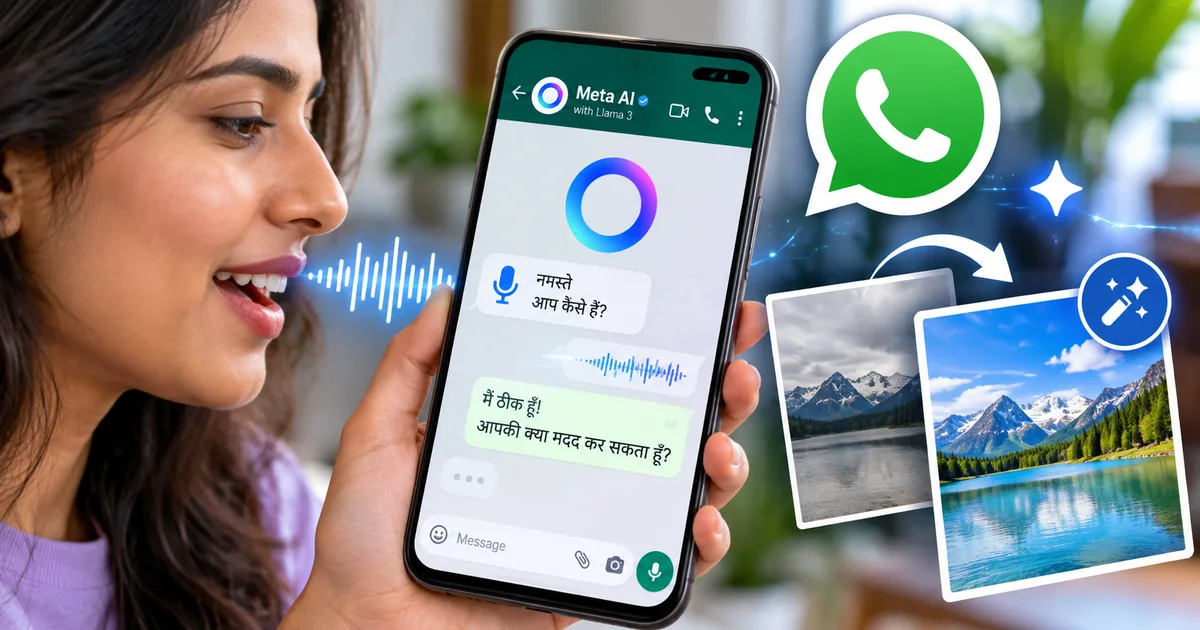
Screenshot walkthrough: The Meta AI chat window has a round soundwave icon next to the standard WhatsApp send button that shows two-way voice mode is active.
Once you stop talking, the screen shows a small pulsing circle while the servers process your audio. The reply starts playing through your phone speaker or earphones in around two seconds. It's quick. You can tap stop whenever the answer gets too long, or just talk over it to ask a follow-up question.
If you need a breakdown of permissions and interface quirks on older Android phones, check out our voice conversation setup guide for step-by-step troubleshooting.
How Hindi voice chat performs in daily Indian life
Talking to an AI in Hindi sounds great in theory, but everyday Indian speech rarely sticks to pure bookish vocabulary. We mix words constantly. You might say, 'Bhai, kal subah train ka timing check karke reminder set kar do.' A strict Hindi translator often chokes on phrasing like that. Meta AI handles casual colloquial Hindi surprisingly well, though.
I spent an afternoon asking it about local mandi rates in Uttar Pradesh, income tax filing dates under the new tax regime, railway tatkal rules, and simple home remedies for sore throats. Pronunciation is reasonably natural. It doesn't sound like some wooden robot from 2012 reading out a textbook. The inflection pauses at sensible spots, and it captures common English loanwords like 'train', 'ticket', 'recharge', and 'doctor' without stumbling.
Thing is, the voice model has clear limits. If you switch into regional dialects or use heavy colloquial slang from rural Bihar or interior Maharashtra, accuracy drops fast. I'm not sure exactly why, but it sometimes guesses the wrong noun and gives an absurdly confident answer to a question you never asked. That's an area where specialized models, such as the Sarvam AI Hindi voice models built specifically for Indic languages, have much tighter nuance across regional accents.
Even so, for standard spoken Hindi and everyday Hinglish, it's remarkably responsive.
Picking a voice style that sounds natural
Meta has a few distinct voice profiles. You can pick between different tones, ranging from calm and conversational to energetic and upbeat. Meta even added celebrity voice options in select global regions, though for most users in India, the core options are standard studio voices tuned for clear speech.
To switch voices, open the Meta AI chat, tap the three dots in the top right corner, select Voice Settings, and check the available audio samples. I think the deeper, slower voice profile is by far the best pick if you plan to listen to long answers in noisy traffic. Faster voices tend to blur Hindi syllables together when street noise leaks into your earbuds.
Editing images with quick chat prompts
Beyond spoken voice chat, Meta added generative image editing directly into the WhatsApp conversation screen. It's built squarely for everyday phone edits. You don't need to open complicated graphic design software or sit through YouTube tutorials just to fix a photo.
The workflow is simple: upload any picture into the Meta AI thread and type what you want changed (which makes sense, actually). You can ask it to remove strangers standing behind you at India Gate, swap a dull grey sky for warm sunset lighting, erase a messy background wire, or turn a product photo of handmade sweets into a clean catalog listing on a wooden table.
Screenshot walkthrough: The photo editor screen shows Meta AI text prompts entered directly beneath an uploaded image, with options to remove background clutter or adjust lighting.
What works well and what falls flat
Let's be honest about what this photo tool can and can't do. Removing a stray dog or an electrical pole from an outdoor portrait works cleanly almost every time. The AI fills in the textures without leaving weird pixel halos.
Changing backgrounds looks convincing too, provided the lighting matches. In my experience, simple objects work best. I took a photo of a brass diya sitting on a kitchen counter and asked Meta AI to place it on a festive rangoli backdrop for Diwali. The result looked sharp enough to share on WhatsApp status updates or put on an invitation card.
But fine details are a complete mess. Don't ask it to edit text on store signboards or fix mangled fingers. If you tell it to alter someone's clothes, it often tweaks their facial features too, so your cousin suddenly looks like a stranger. For serious design projects or brand graphics, you'll still want dedicated standalone AI tools rather than relying solely on quick WhatsApp chat prompts.
Comparing Meta AI with other voice tools in India
How does Meta AI stack up against what Google and OpenAI offer right now? Most Indian users already have Google Gemini on their Android phones and can easily grab ChatGPT from app stores. Cost and friction matter enormously here.
Here's how the three main voice assistants compare for everyday use in India:
| Feature | Meta AI on WhatsApp | ChatGPT Voice | Google Gemini Live |
|---|---|---|---|
| Pricing in India | Free on WhatsApp | Free tier available; Plus costs ₹1,999/month | Free tier available; Advanced costs ₹1,950/month |
| Hindi voice naturalness | Good conversational Hindi and Hinglish | Very smooth and expressive | Strong on facts, slightly formal tone |
| In-chat photo editing | Yes, prompt-based edits in chat | Requires separate generation prompts | Image generation via Imagen |
| Setup friction | Zero extra downloads needed | Requires separate mobile app | Built into Android OS |
| Offline or 2G/3G stability | Buffers on poor connections | Requires stable 4G/5G data | Requires stable 4G/5G data |
At zero cost, Meta AI has the lowest barrier to entry. By far. A college student in Bhopal or a kirana store owner in Surat already opens WhatsApp fifty times a day. They don't need to juggle extra logins or worry about monthly credit card charges in rupees.
Privacy, data storage, and Indian regulations
Here's where we need to talk straight. When you message your friends or business contacts on WhatsApp, chats have end-to-end encryption. WhatsApp can't read them. Nobody snooping on the network can read them either.
Meta AI is completely different. The moment you talk to the AI or send it pictures, those audio clips and images travel directly to Meta's servers for processing.
Voice queries and photo edits sent to Meta AI are processed on Meta cloud infrastructure rather than remaining inside WhatsApp encrypted local storage, meaning conversations with the assistant are not end-to-end encrypted.
Under India's Digital Personal Data Protection Act, platforms operating here must handle consent and personal data with clear disclosures. If you use voice chat, Meta keeps your transcripts to train its language models unless you manually wipe your interaction history in the settings (a hassle, but worth doing).
Regulatory scrutiny has already slowed down other Meta rollouts in India. Earlier this year, government agencies raised concerns about proposed WhatsApp username systems to curb impersonation and financial fraud. The Ministry of Electronics and Information Technology actively tracks how large messaging platforms deploy automated tools. And while Meta introduced the Meta Muse autonomous agent globally, it held India back from the early rollout to sort out local compliance rules.
So treat Meta AI like a public search engine. Ask it for cooking tips, translation help, homework explanations, or quick photo cleanups. But never speak your Aadhaar number, bank OTPs, UPI PINs, or private medical records into that microphone. Seriously, don't do it.
Smart ways to put this to work today
If you want real value out of these features without wasting time on gimmicks, stick to a handful of practical everyday chores.
- Practice speaking English or Hindi by having low-pressure five-minute conversations during your morning walk.
- Draft quick customer responses for WhatsApp Business by speaking your rough thoughts in Hindi and asking the assistant to polish the reply.
- Clean up cluttered photos of products, bills, or event flyers before sharing them across community groups.
Tech is only useful when it saves you time. Having Hindi voice chat and photo tools sitting right inside an app you already use every day makes a genuine difference. For more practical breakdowns of everyday software updates, check out our collection of everyday tech explainers.