I've been following the Samsung One UI 9 warranty menu leak 2026 for a few days now. Honestly, this is one of the more useful features they've added to their phones in years. If you own a Galaxy phone, you know the drill when something breaks. You dig out the original bill. You try to figure out if your standard one-year warranty is still active. Maybe you consider going to that small mobile repair shop in Nehru Place or Gaffar Market because the official service center quote is half the price of the phone. The new update changes this dynamic completely.
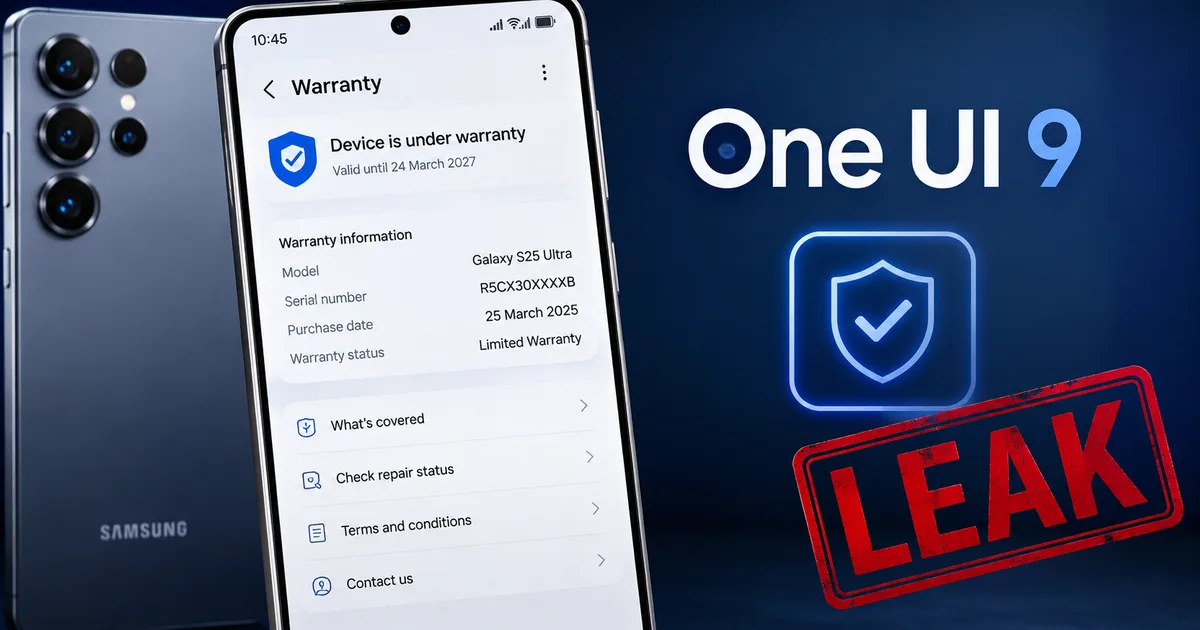
The leaks are everywhere right now. SamMobile and Android Authority both say the upcoming Android 17 based One UI 9 update brings a dedicated "Warranty and care" section straight into your phone's main settings menu. No more downloading the Samsung Members app just to check your coverage. No more hunting for old invoices in your email. It's all right there. But there's a catch. (Always is, right?) This new menu doesn't just show your warranty status. It tracks repairs. And that's where things get super messy for the average Indian user.
We've all been there. Your phone slips out of your hand and hits the concrete. You pick it up. The display is shattered. You check your bank account and realize a 20,000 INR official screen replacement is out of the question this month. You need a cheaper option. But Samsung wants to know exactly what you do next.
What the new warranty and care hub looks like
So what exactly are we getting? Look, based on the leaked builds, Samsung is combining scattered diagnostic and care features into one clean page. You'll find it right under the main Settings menu. It's probably placed near the "Device care" section.
The leaked menu includes:
- A clear indicator of your current warranty status with the exact expiration date based on your device activation.
- Information on your Samsung Care+ coverage if you paid for the extended accidental damage plan.
- A complete history of repairs done on that specific device by authorized technicians.
- Direct links to schedule a repair pickup or find the nearest official service center.
- Hardware diagnostics to test your battery, display, and sensors without extra apps.
(I know, sounds basic. But try finding this info on an older Galaxy device today without losing your mind. I've wasted hours on this myself.)
This is honestly a massive step up for transparency. If you buy a second-hand Galaxy S24 or S25 on OLX or Cashify, you can instantly see if the seller is telling the truth about the warranty. You just open the menu. Check it. The repair history log is even more interesting, because it shows exactly what parts were replaced and when the work happened. But this logging feature relies entirely on Samsung's official backend systems talking to your phone.
The problem with tracking third-party repairs
Here's the deal with the repair history feature. It only logs repairs done by authorized Samsung service centers. So if you crack your screen and take it to a local shop to get a cheaper generic display fitted, that repair won't show up in the official log. Or worse. The phone might actively flag that a non-genuine part was installed.
Apple has been doing this for years with iPhones. If you swap a battery or screen outside their authorized network, the phone yells at you with a persistent notification about "unknown parts" right in the settings menu. And it seems Samsung is moving in the exact same direction with Android 17. For Indian consumers, this is a massive shift. We run on local repairs. If your phone is out of warranty, taking it to an authorized center for a 15,000 INR screen replacement makes zero financial sense. The local shop can do it for 4,000 INR.
The Samsung One UI 9 warranty menu leak 2026 suggests the company wants to keep you firmly inside their own service ecosystem. If the phone starts throwing up permanent warnings about unauthorized repairs, it ruins the resale value of your device. A buyer will look at the warranty menu. They'll see an "unknown part" warning. Then they'll immediately drop their offer by 5,000 INR. This forces you to either pay Samsung's premium repair prices or take a huge financial hit when selling the phone later. I've seen this happen with iPhones all the time in Nehru Place.
And let's talk about the quality of third-party parts. Sometimes they're terrible. But sometimes local technicians use pulled OEM parts from dead phones. Those are genuine Samsung parts. Because they weren't paired to your motherboard by an official Samsung software tool, your phone might still reject them or label them as unknown. That feels extremely anti-consumer.
India's right to repair framework and local shops
We need to talk about how this fits into the broader Indian market context. The Indian government has been actively pushing a "Right to Repair" framework to stop tech companies from locking down their hardware. The Ministry of Consumer Affairs even launched a portal to make repair manuals and spare parts accessible to independent repairers across the country.
I'm not exactly sure how the government will react to software features that penalize third-party repairs. If Samsung uses the new One UI 9 warranty menu to restrict device functionality or scare users away from local shops with scary warning messages, they might face regulatory pushback. The Competition Commission of India doesn't take kindly to companies creating closed monopolies around after-sales service. At least, that's what the recent fines suggest.
Think about the millions of users in tier-2 and tier-3 cities. They don't have a shiny Samsung authorized service center down the street. Their only option is the local mobile technician who fixes everything from old Nokia feature phones to the latest foldables. If Samsung's software makes those repairs look dangerous or invalid, it hurts the consumer. It destroys local businesses too. We'll just have to see exactly how aggressive Samsung gets with these unverified part warnings once the stable update drops.
Check out our explainers section for more details on consumer rights and tech policies in India. You'll find a lot of information on how regulations are trying to keep tech companies in check.
Diagnostics and device health features
Aside from the controversy around repair tracking, the new menu brings some genuinely excellent diagnostic tools. You can test your battery health. You can check if your touchscreen has dead zones. You can also verify that the sensors are working correctly.
This is super helpful if your phone feels sluggish and you're trying to figure out why. Instead of downloading sketchy third-party apps to test your hardware, you can use the built-in tools. If you suspect a hardware failure, you run the diagnostic. Then you get a clear answer before taking time off work to visit a service center.
I tried the older version of these diagnostics in the Samsung Members app last week. They work well, but burying them inside a separate app meant nobody used them. Moving them to the main settings page is a smart UX decision. (Which, for the record, I think is actually a good thing).
Battery health is the big one here. iPhone users have obsessively checked their battery health percentage for years. Samsung has avoided giving users a simple percentage number, instead offering vague ratings like "Good" or "Normal". The leaks suggest One UI 9 might finally give us more detailed metrics about battery degradation. The numbers here are a bit fuzzy still. But when your phone is two years old and barely holds a charge through lunchtime, having actual data to prove the battery is degraded makes dealing with warranty claims much easier.
When will the One UI 9 update reach your phone?
If you're currently holding a Galaxy device, you're probably wondering when you'll get this update. The One UI 9 beta program, based on Android 17, is already kicking off.
According to recent announcements and news reports, the beta is opening up for the Galaxy S26 series in India right now. Samsung usually runs these beta programs for a couple of months to iron out the bugs. We can expect the stable release to start rolling out to the flagship devices by late October or November 2026.
Expected rollout schedule
- Galaxy S26, S26 Plus, and S26 Ultra: Late 2026
- Galaxy S25 series: Late 2026 to Early 2027
- Galaxy Z Fold8 and Flip8: Late 2026
- Galaxy A55 and A54: Early 2027
- Older eligible models: First half of 2027
Samsung doesn't roll out every single feature to the budget M-series or F-series phones. The cheaper devices often get a stripped-down "Core" version of One UI. I'd expect the basic warranty status check to make it to all phones. But advanced diagnostic features might stay exclusive to the mid-range and premium models.
Protecting yourself when buying used phones
The used phone market in India is massive. Platforms like Cashify have normalized buying refurbished devices. If you're buying a used phone directly from an individual on OLX or Facebook Marketplace, this new menu is your best friend.
Always ask the seller to open the Warranty and care menu in front of you. Check the expiration date. Compare it against the physical invoice they hand you. Look at the repair history. If the seller claims the phone has never been opened but the menu shows a screen replacement from six months ago, just walk away. They're lying to you.
And watch out for common scams where sellers show fake PDF invoices to claim a phone is still under warranty. They edit the dates using basic software. The system-level menu pulls data directly from Samsung's servers based on the IMEI number. It's much harder to fake. If the menu says the warranty is expired, the warranty is expired, regardless of what the printed piece of paper says.
When buying a used Galaxy phone on OLX or Cashify, the new Warranty and care menu is the only proof you need. Ignore printed invoices. Trust the system menu.
Final thoughts on the Android 17 update
Software updates usually just bring minor visual tweaks or slightly better battery life. This one is different. The Samsung One UI 9 warranty menu leak 2026 reveals a feature that actually changes how we manage and repair our phones.
It gives you better access to your own data. But it also tightens Samsung's grip on the repair ecosystem. I suggest keeping a close eye on how this menu behaves once it hits stable release. We need to see if it starts throwing up warnings for third-party batteries or screens. For now, if your Galaxy phone breaks, you still have the freedom to choose where you get it fixed. Just know that Samsung is keeping a much closer eye on exactly who is opening up their devices.