The fake EPFO higher pension order WhatsApp APK scam 2026 is the latest and honestly one of the most vicious frauds I've seen targeting Indian seniors and salaried employees. Look, retirement savings are sacred. You work your whole life. You stash away a part of your salary every month, and trust that the Employees' Provident Fund Organisation (EPFO) will have your back when you finally stop working. Scammers know this. They know how anxious people are about their money. And right now, they're using the confusion around the new Employees' Pension Scheme (EPS) 2026 to steal your hard-earned cash.
I get it. The news is full of updates about the new EPS framework under the Code on Social Security, 2020. People are reading about the 20-day claim settlement and new withdrawal rules (which makes sense, actually, given the delays). There was even a recent Bombay High Court ruling saying missing records can't by themselves defeat higher pension claims. It's a lot of information to process. Scammers are banking on this exact confusion.
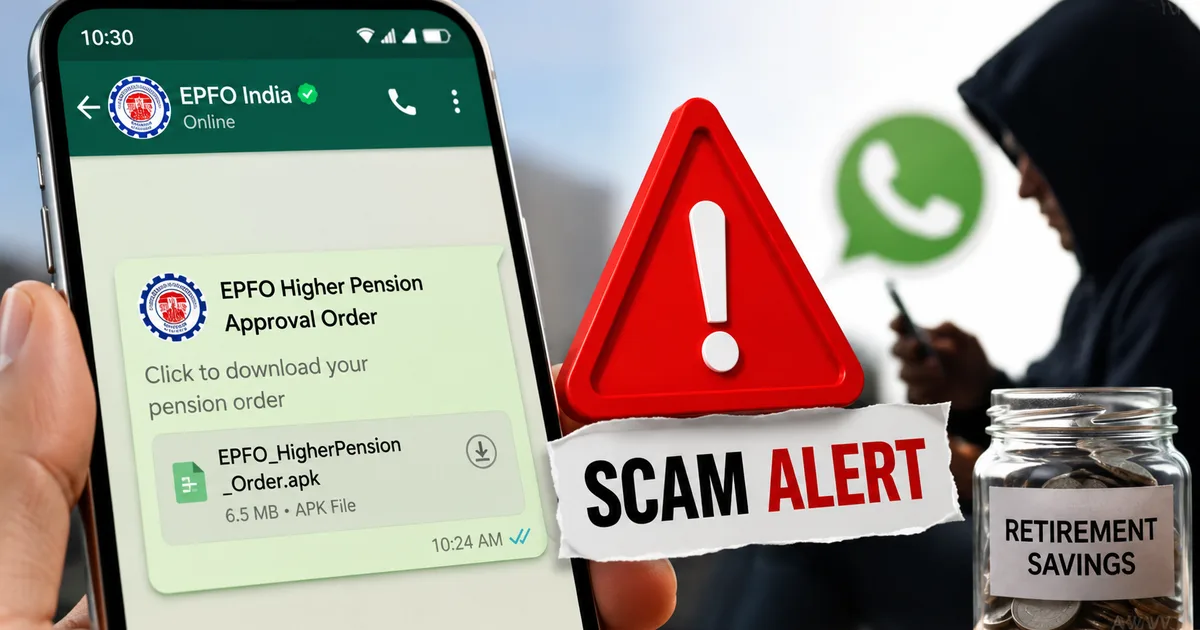
They send you a WhatsApp message that looks incredibly official. It says your higher pension claim has been approved or needs urgent verification. But there's a catch. You have to download an 'official order' to proceed. That order isn't a PDF. It's an APK file. And the moment you install it, you hand over complete control of your phone to a criminal sitting hundreds of miles away.
How the fake EPFO APK scam actually works
You need to understand the mechanics of this fraud to see it coming. It doesn't start with a phone call asking for your OTP. People have gotten too smart for that. Instead, it starts with trust. And a false sense of urgency.
Here's the exact step-by-step process of how they drain your account.
- First, the bait message arrives. You get a WhatsApp message from a number that often has an official-looking EPFO logo as its display picture. The text is usually written in formal English or Hindi. It might say something like, 'Dear Member, your application for higher pension under EPS-95 has been processed. Download the attached order to confirm your bank details.'
- Next comes the sense of urgency. There is always a ticking clock. The message will warn you that if you do not act within 24 hours, your claim will be rejected or your pension will be stopped. This is designed to make you panic and stop thinking rationally.
- Then they push the malicious download. They attach a file. But if you look closely, the file name ends in .apk, not .pdf. For example, it might be named 'EPFO_Pension_Order_2026.apk'. An APK is an Android application package. It is the file format used to install apps on Android phones.
- After that is the installation trap. If you tap the file, your phone will likely warn you about installing unknown apps. The scammers know this. Their message usually includes instructions telling you to go to your settings and enable 'Install from unknown sources' to view the document. Once you do this and hit install, you are in deep trouble.
- This leads to a total loss of control. The app does not show you a pension order. Instead, it silently installs malware on your phone. This malicious software runs in the background. It can read your SMS messages, see your screen, and even intercept your banking OTPs without you ever noticing.
- Finally, the final blow lands. With access to your text messages, the scammers log into your net banking or UPI apps. They initiate transfers. When the bank sends an OTP to your phone to verify the transaction, the malware intercepts it, sends it to the scammers, and then deletes the SMS from your phone so you do not even see the alert. Your bank account is emptied in minutes.
This isn't an exaggeration. We just saw a similar scam where a man was duped of over 4 lakh rupees through a fake PM Kisan Yojana APK link. The mechanism is exactly the same, they just change the bait to match the latest news cycle. I think people need to talk about this more. I recommend keeping up with latest phishing tactics so you're never caught off guard.
Why this scam is so effective right now
Honestly, the timing is what makes this so dangerous. The Labour Ministry and EPFO have been making a lot of changes lately. The introduction of the new EPF Scheme 2026 and discussions around performance-linked incentives affecting EPF contributions have everyone on edge. It's a mess, in my experience, trying to track all these updates.
When people are expecting news about their money, they drop their guard. If you've genuinely applied for the higher pension option, getting a message about it feels normal. You might think it's just the government modernizing its communication channels.
But the EPFO has explicitly warned subscribers against fake calls and sketchy links amid this surge in online fraud. The government machinery moves slowly. It doesn't send Android installation files over WhatsApp to handle official business.
The real EPS 2026 changes versus the scam claims
To really protect yourself, you need to know what's actually happening with the EPS 2026 changes. Knowledge is your best defense. The Code on Social Security is bringing in some genuine modifications. For instance, we're seeing news about a 20-day claim settlement process being implemented. That's a real, positive change designed to reduce the waiting time for retirees.
There are also ongoing discussions about the INR 1,800 wage ceiling and whether contributions beyond that will be strictly voluntary. I'm not sure exactly why it's taking so long to clarify. The Bombay High Court recently made a significant ruling stating that if an employer has a deficient system of recordkeeping, the EPFO can't use that as an excuse to deny higher pension claims to the employee. This is huge news for thousands of pensioners who were worried about missing paperwork from decades ago. You can read more about genuine EPFO updates to stay informed.
But notice how all these real changes are administrative. They happen in the background. They involve court rulings and portal updates. None of them involve a random official texting you a file to install on your personal phone. The scammers take these real headlines and twist them to create a false sense of urgency.
Warning signs you cannot afford to ignore
You have to train yourself to spot these red flags. Once you know what to look for, these scams become painfully obvious.
- The file format is the biggest giveaway. Real documents from the government will always be in PDF format. Sometimes they might send a link to a secure portal. They will never, ever send an APK file.
- Unsolicited WhatsApp messages are a massive red flag. The EPFO does not initiate official claim settlements or send approval orders via WhatsApp. Official communication happens through the UAN member portal, registered email, or physical mail. If a random number messages you claiming to be from a government department, assume it is a scam.
- Requests to bypass security settings should stop you in your tracks. Your Android phone has built-in security features to stop you from installing apps outside the Google Play Store. If someone gives you instructions on how to bypass these warnings and enable installation from unknown sources, they are trying to hack you.
- Grammar and spelling mistakes are still common. While scammers are getting better, many of these messages still contain weird phrasing, awkward capitalization, or grammatical errors that an official government communication would not have.
- High-pressure tactics are a classic manipulation technique. Real government processes take time. They will give you weeks or months to respond to a query. If a message says your account will be blocked or your pension canceled by tonight if you do not click a link, it is a lie designed to cause panic.
"If a file ends in .apk, it is an app trying to install itself on your phone. Delete it immediately and block the sender. The government will never send you software over WhatsApp."
How to protect your retirement savings
Basically, staying safe isn't about being a tech genius. It's just about building a few simple online safety habits and sticking to them. Here's exactly what you need to do to keep your money safe.
First, never install apps from outside the official Google Play Store or Apple App Store. Go to your Android phone settings right now. Search for 'Install unknown apps' or 'Unknown sources'. Make sure this permission is turned off for all your apps, especially WhatsApp and your web browser. This one setting is your strongest shield against APK scams.
Second, verify everything independently. If you get a message about your EPF account, don't click anything in the message. Open your web browser, type in the official EPFO website address, log in to your UAN portal, and check your notifications there. If there's a real issue with your pension, it'll be listed in your official account dashboard.
Third, set up transaction limits on your bank accounts (annoying, I know, but worth it). Most banking apps now allow you to set daily limits for UPI and debit card transactions. Keep these limits reasonably low for your daily use. If you need to make a large payment, you can temporarily increase the limit and drop it back down immediately. This way, even if a scammer gets access to your account, they can't drain the entire balance in one go.
Fourth, talk to your parents and older relatives. They're the primary targets for these pension scams. Sit down with them over the weekend. Show them what an APK file looks like. Explain that the government will never send an app over WhatsApp. A five-minute conversation could save their life savings.
And finally, be ruthless about blocking and reporting. Don't engage with these numbers. Don't try to scold the scammer. Just report the message as spam within WhatsApp and block the number immediately.
What to do if you clicked the link
Okay, let's say the worst happens. You were distracted, and you installed the APK. What now? You need to act extremely fast.
Don't wait to see if money disappears. The clock is ticking.
- Disconnect from the internet immediately. Turn off your mobile data and Wi-Fi right away. Even better, switch your phone to Airplane mode. The malware needs an internet connection to send your OTPs to the scammers. Cut the cord.
- Lock your accounts using a different device. Use another device, like a laptop or a family member's phone, to log in to your net banking. Change your passwords immediately. Call your bank's customer care hotline and tell them your phone is compromised and they need to freeze your accounts and block your UPI.
- Report the crime without delay. This is non-negotiable. You must report this to the authorities. Call the National Cyber Crime Helpline at 1930 immediately. You can also file a detailed complaint on the official government portal at cybercrime.gov.in. The faster you report, the higher the chance your bank can freeze the fraudulent transactions.
- Clean your device completely. You cannot trust a phone that has been infected with malware. Simply uninstalling the fake app is not enough, as it might have downloaded other hidden malware. You need to back up your photos and essential contacts, and then perform a complete factory reset on your phone. It is a massive pain, but it is the only way to be sure your device is clean.
The Indian Computer Emergency Response Team (CERT-In) regularly issues advisories about these types of malware campaigns. They consistently warn that cybercriminals exploit current events, like the rollout of the EPS 2026 scheme, to distribute malicious apps.
It's exhausting having to constantly be on guard against these threats. But until the telecom networks and social media platforms figure out a way to block these scammers at the source, we have to protect ourselves. If you ask me, the platforms need to step up. Your pension is the result of decades of hard work. Don't let some criminal with a cheap smartphone and a fake WhatsApp account take it away from you in five minutes.
Stay sharp. And never install random files sent to your phone.