If you have spent any time asking ChatGPT to write an article or debug a Python script, you know the frustration. You ask it to change one line, and it spits out the entire 600-word response all over again. You sit there waiting, scrolling up and down, trying to spot what changed. OpenAI Canvas fixes this exact problem, turning the chatbot into a dual-pane workspace where you and the AI work on the same document side by side.
OpenAI rolled out Canvas to ChatGPT Plus, Team, and Free tier users across web and desktop apps. After testing it extensively on everyday Indian workloads, like drafting client emails, rewriting resume bullets, and fixing messy JavaScript code, I can tell you it changes how you get work done. It is not just another gimmicky add-on. It is the first time ChatGPT feels like a real digital colleague rather than an eager intern blurting out answers from across the room.
What is OpenAI Canvas?
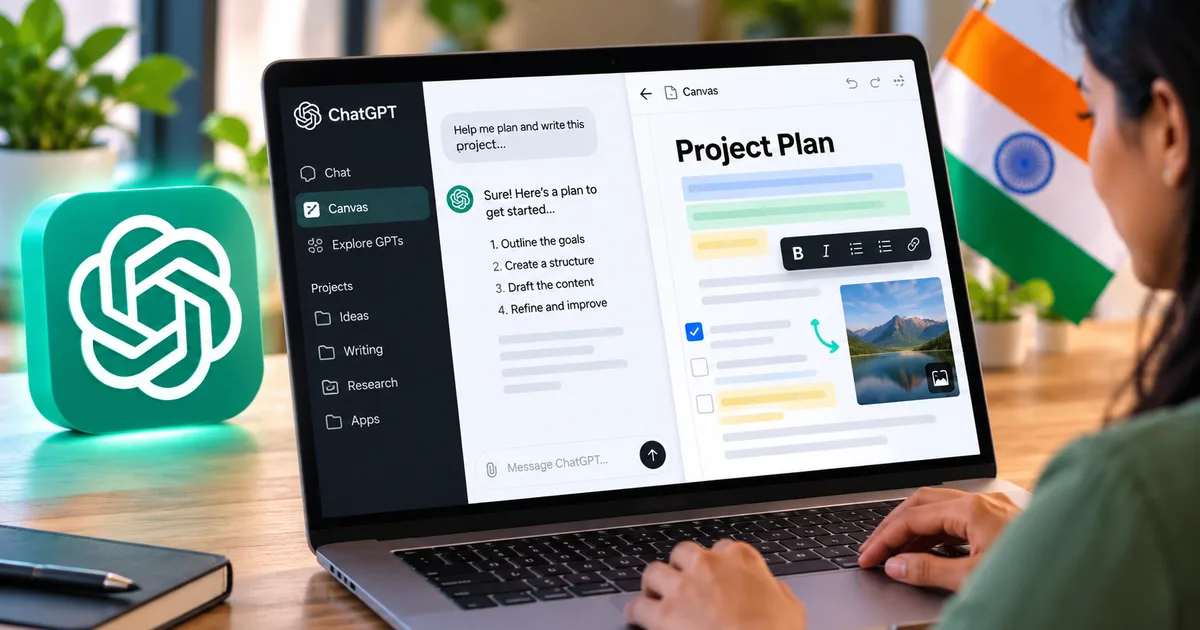
At its core, Canvas opens a dedicated editor window right next to your standard chat stream. When you write a prompt that looks like a project, say, drafting an essay or writing a React component, Canvas pops open on the right half of your screen.
The chat stays on the left. Your working document sits on the right. You can edit the text directly on the right pane just like you would in Google Docs or VS Code. If you want ChatGPT to modify something, you highlight a specific sentence or function, ask for the tweak, and it updates only that section. The rest of your text stays untouched. (I know, sounds simple, but anyone who has wrestled with standard chat interfaces knows how massive this quality-of-life update actually is).
Anthropic launched something similar earlier with Artifacts, which you can read about in our Claude AI desktop app hands-on guide. But while Claude Artifacts focused primarily on rendering previews of websites, games, and static code, Canvas acts as an interactive text and code editor with purpose-built utility shortcuts.
How to access OpenAI Canvas in India
Getting into Canvas does not require any strange VPN tricks or regional workarounds. OpenAI has made it available natively to users in India.
Here is what the setup looks like right now:
- ChatGPT Free users have access to Canvas on GPT-4o mini, though usage caps apply during peak traffic hours.
- ChatGPT Plus subscribers (which costs $20 a month, roughly ₹1,999 after Indian banking taxes and 18% GST) get full, unlimited access across both GPT-4o and advanced reasoning models.
- Team and Enterprise accounts have Canvas enabled by default in their workspace settings.
If you are looking for more affordable options, check our overview of top AI tools and software where we track price changes across Indian payment methods like RuPay and UPI auto-pay.
To launch Canvas manually, open ChatGPT on your browser or desktop app. In the model picker drop-down at the top, select GPT-4o with Canvas. Alternatively, you can simply type a prompt starting with "use canvas to create..." or "open canvas and write a script for..." and the system triggers the split-pane view automatically.
Writing in Canvas: Shortcuts and practical features
When you use Canvas for writing, a small pencil icon sits in the bottom-right corner of the editor window. Clicking that icon brings up five built-in editorial sliders and shortcuts.
These writing tools include:
- Suggest edits: ChatGPT adds inline suggestions similar to Google Docs comments, offering phrasing tweaks, clarity fixes, and grammatical corrections without overwriting your original copy.
- Adjust length: A slider that condenses the text down to a quick summary or expands it into detailed, long-form paragraphs.
- Reading level: You can toggle the reading level from middle school grade up to graduate level or technical corporate speak.
- Add final polish: Checks the flow, fixes punctuation quirks, and irons out awkward transitions.
- Add emojis: Adds relevant emojis across headers and bullet points. Honestly, this is probably the least useful button of the bunch, but it is there if you write social media copy.
The targeted inline editing is where Canvas really shines. Say you are drafting an email to an Indian client negotiating freelance rates in rupees. You like the greeting and the portfolio summary, but the payment terms sound too rigid. In standard ChatGPT, asking for a softer tone often ruins the crisp opening paragraphs. In Canvas, you highlight the fee schedule paragraph, click "Ask ChatGPT", type "make this friendlier and mention 50% advance via UPI", and it rewrites only those three lines. It saves minutes on every revision.
Coding in Canvas: A huge step up for Indian developers
If you write code for college projects, freelance web clients, or full-time IT work, Canvas is noticeably better than standard chat windows. Trying to debug large blocks of code in an ordinary chat thread usually leads to hallucinated functions and truncated outputs.
When you paste or generate code in Canvas, the pencil icon changes to a coding toolkit icon with several specialized actions:
- Review code: Inspects your logic, flags memory leaks, points out edge cases, and suggests performance enhancements inline.
- Add logs: Inserts print statements or console log statements automatically across crucial execution paths so you can debug faster.
- Add comments: Writes clean, readable comments above complex blocks so your teammates or college evaluators understand the logic.
- Fix bugs: Rewires flawed logic or syntax errors directly in the code window.
- Port language: Converts your current file into JavaScript, Python, TypeScript, C++, PHP, or Java with a single click.
For engineering students across India working on data structures or backend frameworks, the code review button alone is worth trying. It explains why a particular loop is slow instead of just tossing revised code at you without context. If you want to understand how OpenAI is shaping its broader footprint across tech hubs in Bengaluru and Hyderabad, see our breakdown of Sam Altman's plans for OpenAI in India.
Canvas vs standard chat vs Claude Artifacts
How does Canvas stack up against what we already have? The differences come down to control and friction.
| Feature | Standard ChatGPT | OpenAI Canvas | Claude 3.5 Artifacts |
|---|---|---|---|
| Editing experience | Regenerates entire response | Direct inline text editing | View code/preview only, edit via chat |
| Targeted modifications | Difficult, requires precise prompting | Select any section and rewrite | Must prompt Claude to alter section |
| Code debugging tools | Manual chat prompts | One-click logs, review, bug fixes | Direct live preview for React and HTML |
| Version history | Scroll through chat log | Built-in restore button to go back | Version slider to flip through iterations |
| Free user availability | Full access | Limited access on GPT-4o mini | Available with daily message limits |
Canvas is strictly an editor. Claude Artifacts, on the other hand, can run and render interactive React web apps, SVG diagrams, and HTML mockups right inside the browser window. If you need to see a button actually click or a dashboard render visually, Claude still holds an edge. But if you are writing backend logic, Python scripts, or long-form text documents, Canvas feels much faster to use.
Step-by-step: How to build a project using Canvas
Let us walk through an actual use case: building a simple freelance invoicing template and payment reminder email.
Step 1: Open the Canvas interface
Log in to ChatGPT. Start a new conversation. If you have Plus, select the Canvas option. If you are on the free tier, write: "Open canvas and draft a freelance services agreement for an Indian web designer charging in INR."
Step 2: Review and manually tweak the text
The agreement appears on the right panel. Read through the text. Instead of typing back and forth, click into the document directly. Change the placeholder client name, update the payment terms to include your bank IFSC code and UPI ID, and delete any liability clauses you do not need.
Step 3: Use targeted revision prompts
Highlight the cancellation clause. A small speech bubble appears saying "Ask ChatGPT". Click it and type: "Add a clause that if the project is cancelled after milestone 1, the 30% advance deposit is non-refundable." ChatGPT updates that exact paragraph while leaving your banking details and project timelines on the rest of the page completely untouched.
Step 4: Use the version control button
Look at the top right of the Canvas pane. You will see an arrow icon that allows you to step back through every single change you or the AI made. If a suggested edit made the legal language too aggressive, click the back arrow to restore the previous clean version immediately. No manual copy-pasting required.
Real limitations you should know about
Canvas is good, but let us be real: it is not flawless. I ran into a few annoying quirks during everyday use.
First, mobile usability is basically nonexistent. If you use ChatGPT primarily on your Android phone or iPhone while commuting on the Delhi Metro or Mumbai local, the split-screen layout simply does not fit. On small screens, Canvas takes over the entire viewport, forcing you to toggle awkwardly between chat and document modes. It is distinctly built for a laptop or desktop monitor.
Second, the automatic trigger can be stubborn. Sometimes you want a quick two-sentence answer to a factual query, but ChatGPT decides your question sounds like a "document" and aggressively opens Canvas. You can close it with the top-right exit button, but having it pop up unprompted gets old fast.
Third, token limits still apply. If you paste a massive 4,000-word academic paper or an entire legacy repository file, Canvas starts lagging during inline revisions. It works best on modular chunks: individual blog posts, single code components, or formal letters.
Canvas fixes the most annoying part of conversational AI: the endless scrolling and re-generating. But it works best on desktop screens where you have room to view both windows at once.
Who gets the most value out of this?
Indian freelancers juggling international and domestic projects will find the writing tools genuinely useful. It cuts down the back-and-forth when tailoring cover letters for Upwork or formal RFPs for local businesses.
Students preparing technical seminar papers or learning new programming stacks can use the "Review Code" and "Suggest Edits" options like a personalized tutor. Instead of turning in unverified AI garbage, you can check what the code is doing line by line before submitting it. For more study-oriented AI workflows, take a look at our guide on using Perplexity AI for research.
Small business owners who write their own marketing copy, GST invoice templates, and customer support macros will also save hours. You do not need an expensive third-party copywriting suite when Canvas handles formatting, tone shifts, and versioning right inside ChatGPT.
The bottom line
Canvas marks a noticeable shift in how AI interfaces work. The novelty of talking to a chatbot wore off a long time ago. What people actually want is software that helps them finish writing an email or patch a software bug without unnecessary friction. Canvas delivers on that front. If you have been ignoring the feature because it looked like just another UI tweak, give it an honest twenty minutes on your next coding problem or draft document. You probably will not want to go back to standard chat windows.