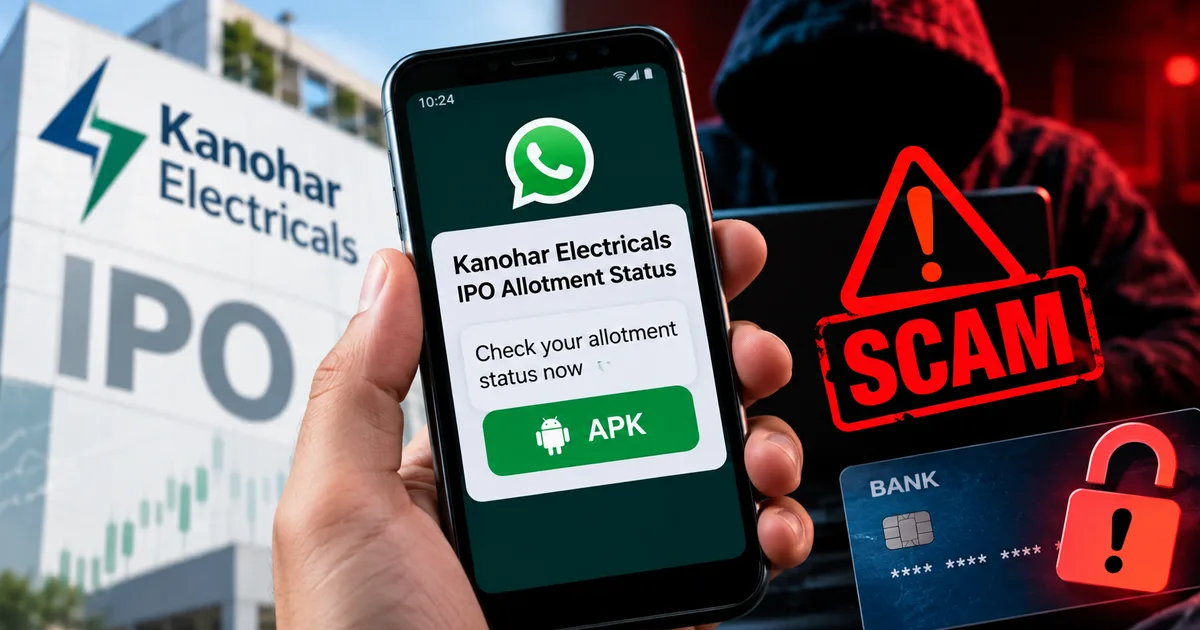
The Indian stock market is booming, and IPO fever is everywhere. We've seen massive hype around recent offerings. But with big money comes big fraud. Right now, a dangerous new fraud is spreading fast. I'm talking about the Fake Kanohar Electricals IPO Allotment Status WhatsApp APK Scam 2026, and it's specifically designed to drain your bank account while you think you're checking your share allocation.
If you applied for this IPO, you're probably anxious to know if you got lucky. Scammers know this. Honestly, they exploit that exact anxiety. They send a direct message with a simple file to download. It looks helpful. It isn't. It's a trap.
Indian retail investors are pumping record amounts of money into the stock market. People see their neighbors making quick money in a week, and they want in. This fear of missing out makes people act irrationally. And scammers are financial predators. In my experience, they feed on that exact irrational behavior.
What the Kanohar Electricals IPO scam actually is
Basically, criminals are sending messages on WhatsApp claiming they have a direct link to check your allotment status. They know the official registrar websites get clogged with traffic on allotment day. When you're frustrated trying to load the KFintech or Link Intime page, their message pops up. It offers a faster way to check.
But instead of a normal website link, they send an APK file. For those who don't know, an APK is an Android application package. It's the file format Android uses to install apps. When you install an app from the Google Play Store, it happens in the background. When you download an APK directly from WhatsApp, you're bypassing all of Google's security checks (which makes sense, actually, if you think about how Android is built).
This file isn't a status checker. It's malware. Plain and simple. The moment you install it, you give criminals access to your phone.
We've seen this pattern before. Recently, an 83-year-old retiree lost Rs 1.19 crore in a fake IPO scam. Another man lost 45 lakh to a fake trading app. The financial damage is a mess. Scammers are ruthless. If you want more details on similar frauds, check our scam alerts and safety section.
Thing is, the Kanohar Electricals name is just the current flavor of the week. Tomorrow they'll use the name of the next big company hitting the market. I'm not sure exactly why people trust these random files, but the underlying tech of the theft remains exactly the same.
How the WhatsApp APK fraud works step by step
Let's break down the exact mechanics of this crime. Understanding the steps is your best defense. You need to know how the trick is performed so you don't fall for the illusion.
Step 1: The unsolicited message
You get a WhatsApp message from an unknown number. It might have a professional-looking logo as the profile picture. The text says something urgent about the Kanohar Electricals IPO allotment. It might claim that the servers are down and you need to use their special app to check if you got shares. They speak with authority. And they make it sound like a secret workaround.
Step 2: The APK download
Attached to the message is a file. It is usually named something like "Kanohar_IPO_Status_Check.apk" or "Allotment_Fast_Tracker.apk". The sender pushes you to download and install it immediately. They might even send fake screenshots of other people successfully checking their status to build trust. It's a common trick.
Step 3: The dangerous permissions
If you make the mistake of installing it, the app will ask for permissions. It'll want access to your SMS messages. It'll want access to your contacts. It might even ask for screen viewing rights. Most people just click "Allow" without reading. That's the fatal error. You just handed over control of your digital life. I think this is where the real damage happens.
Step 4: The silent robbery
Once the app has SMS permissions, the trap snaps shut. The scammers start a bank transfer or UPI payment from their end using your phone number. Your bank sends an OTP via SMS to confirm the transaction. You never see this OTP. The malicious app intercepts the text message, hides the notification from you, and sends the code directly to the scammers.
They drain your bank account while your phone sits quietly in your pocket. The whole process takes minutes. This tactic isn't unique to IPOs. We saw the exact same technical trick used in the BSNL 5G SIM upgrade scam. The wrapper changes, but the poison is the same.
Warning signs of fake IPO allotment links
You need to train yourself to spot these red flags. The Kanohar Electricals IPO might be the bait today, but tomorrow it'll be something else. Look at the frenzy around recent IPOs. The Rentomojo IPO had a GMP signaling a 39% listing gain. Hero Motors showed a 23% premium. People are desperate for these listings. And desperation makes you blind to obvious warnings (annoying, I know).
Here are the signs you're dealing with a scam:
- Official registrars don't send APK files on WhatsApp. KFintech, Link Intime, and Bigshare Services will send you an email or an SMS with a standard web link. They'll never ask you to install an app to check your status.
- The message comes from a random ten-digit mobile number. Official communications usually come from verified business accounts or specialized sender IDs like "AD-KFINTECH".
- Scammers always create false urgency. They tell you that you must check right now or lose your shares. Real financial systems don't operate on artificial deadlines like that.
- The file extension is a dead giveaway. If a file ends in ".apk", it's an app installation file. Unless you specifically sought out an app from a trusted source, you shouldn't ever touch an APK sent by a stranger.
How to protect your bank account from APK malware
Look, keeping your money safe requires a few hard rules. You can't rely on your bank to catch every fraudulent transaction. You have to lock the front door yourself. You can stay updated on these threats by following our latest tech news.
Disable unknown sources on your phone
Go to your Android settings right now. Search for "Install unknown apps". Make sure your browser and WhatsApp don't have permission to install apps. This puts a physical block on accidental APK installations. If you tap a sketchy file by mistake, your phone will stop and ask you for a password or fingerprint before proceeding. That pause can save your life savings.
Never check IPO status via WhatsApp
I don't care how slow the official website is. Wait. Use the NSE website or the official registrar's portal. You enter your PAN card number and your application number on a secure webpage. That's the only safe way. I recommend bookmarking the official NSE allotment page on your browser so you never have to search for it on Google, where fake sites sometimes buy ads to appear at the top. It's just smarter, if you ask me.
Verify the source of your information
If you're reading about guaranteed IPO allotments in a Telegram group or a WhatsApp forward, you're swimming with sharks. There's no such thing as guaranteed allotment. It's a lottery system governed by SEBI. Anyone offering a sure thing is a criminal. We documented this exact lie in our report on the fake Rentomojo IPO telegram fraud. Stay away from unverified tipsters.
Use a separate phone for banking
If you can afford it, buy a cheap basic smartphone. Install only your banking apps and UPI apps on it. Don't install WhatsApp. Don't use it for social media. Keep it at home. Use your main phone for everything else. If your main phone gets compromised by an APK, the scammers get nothing because your banking apps are physically located on a different device. That's extreme, but it works.
What to do if you installed the fake Kanohar Electricals app
If you're reading this too late and you already installed the file, you're in a high-risk situation. Don't panic, but act immediately. You're in a race against the scammers.
First, put your phone in airplane mode. This cuts off the internet connection and stops the app from sending your OTPs to the scammers.
Second, use a different device to call your bank immediately. Tell them your phone is compromised and ask them to freeze your account and block all digital transactions.
Third, don't just delete the app. Malicious apps hide deep in your system. You must do a complete factory reset of your Android phone to make sure the malware is completely gone. Yes, you'll lose data if it isn't backed up. But you'll lose your money if you don't.
You should also check your Aadhaar authentication history. Scammers sometimes try to use intercepted OTPs to access your DigiLocker or create fake bank accounts in your name using e-KYC. Log into the UIDAI portal and disable biometric authentication temporarily. If you see unrecognized authentication requests, report them immediately. Your DigiLocker holds your PAN and Aadhaar documents, and if scammers get access to that, they can steal your identity and your current bank balance.
Where to report cybercrime in India
Reporting the crime isn't just about getting your money back. It helps authorities track the networks behind these frauds.
If you're a victim of financial cyber fraud, dial 1930 immediately. This is the National Cyber Crime Reporting Portal helpline. The first 24 hours are important for freezing the stolen funds.
You must also file a formal complaint online. Go to cybercrime.gov.in. This is the official government portal. You'll need your bank statements, the phone number that sent you the message, and a copy of the malicious APK file if you still have it. Don't skip this step. The police need this data to track the syndicates running these operations.
The Indian Computer Emergency Response Team (CERT-In) regularly issues warnings about these exact Android malware campaigns. You can check their official website at cert-in.org.in for technical advisories. They track the evolution of these threats constantly. The numbers here are a bit fuzzy, but they see it all.
IPOs are a great way to build wealth. But you've got to stay sharp. The stock market is heavily regulated. The wild west of WhatsApp groups and Telegram channels isn't. Don't let the excitement of a listing gain blind you to the basic rules of digital safety. Check your allotment status only on the official registrar websites. Protect your phone like you protect your physical wallet. Because right now, the scammers want your digital wallet more than anything else.