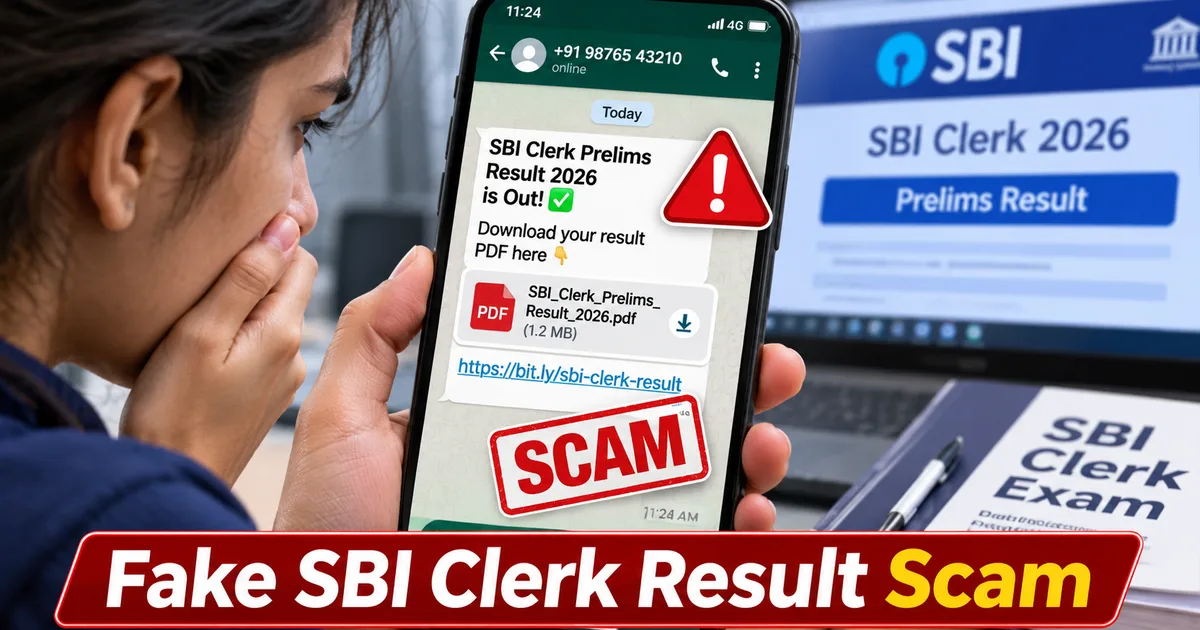
If you are waiting for competitive exam scorecards right now, you need to be extra careful. A dangerous new fraud campaign is making rounds on messaging apps, targeting lakhs of banking aspirants across the country. Scammers are currently forwarding malicious files claiming to be the official SBI Clerk Prelims Result 2026 scorecard. Thing is, these documents aren't real scorecards at all. They are weaponized APK files designed to take complete control of your smartphone.
As someone who spends a lot of time tracking digital frauds, I get genuinely frustrated seeing how scammers prey on student anxiety. When you are stressed about cutoffs, normalization scores, and mains exam preparation, your guard is naturally down. Fraudsters know this. They exploit your vulnerability by pushing fake PDF links into Telegram channels and WhatsApp study groups. If you tap that download button, you aren't checking your marks. You are handing over the keys to your digital life.
How the fake SBI clerk result WhatsApp scam works
The mechanics of this attack are disturbingly simple yet effective. The whole operation relies on social engineering and fake urgency. Cybercriminals create polished messages that mimic official notifications from the State Bank of India or the Institute of Banking Personnel Selection. They use convincing headers, logos stolen from legitimate portals, and urgent phrasing like direct link to download prelims scorecard PDF now.
Here is the step-by-step breakdown of how you get trapped:
- You receive a forwarded message in a WhatsApp study group or a public Telegram channel claiming the SBI Clerk Prelims Result 2026 is out.
- The message includes a compressed file attachment or a shortened link ending in a suspicious domain instead of the official sbi.bank.in domain.
- When you click the link, it downloads a file named something like SBI_Clerk_Result_2026.apk instead of a harmless PDF document.
- If your phone warns you about installing apps from unknown sources, the accompanying chat instructions tell you to bypass the warning and grant full accessibility permissions.
- Once installed, the malicious app hides its icon, intercepts your incoming SMS messages, and quietly logs every keystroke you make on your screen.
Honestly, watching people fall for these tricks hurts because the damage goes far beyond a lost phone. Once these trojan apps gain accessibility access, they can read your UPI transaction pins, harvest your net banking passwords, and drain your savings accounts in minutes. According to recent alerts from agencies like CERT-In, malicious APK campaigns targeting job seekers have spiked heavily over the past year. If you want to check safer ways to handle digital tools, you can explore our AI Tools & Software section or read our detailed How-to Tech Guides.
Warning signs to spot the fraud
You don't need to be a cybersecurity expert to spot these scams. You just need to slow down and look at the details. Real banking exam boards operate under strict protocols. They never distribute individual scorecards or merit lists through compressed files shared on personal messaging apps.
Watch out for these glaring red flags:
- The file extension ends in .apk or .exe instead of .pdf. Real scorecards never require you to install an application just to view your marks.
- The web address in the browser bar looks slightly misspelled or uses strange extensions like .in-sbi or .net-bank instead of the official government domain.
- The message is heavily forwarded. WhatsApp shows a forwarded label on messages that bounce between multiple groups. Official announcements do not travel this way.
- You are asked to pay a small fee to view your scorecard or unlock your merit status. Legitimate public sector banks never charge money to check exam results.
Remember that the real recruitment process requires you to log in with your registration number, roll number, and date of birth directly on the secure portal. If a message promises a shortcut or an early PDF download through a random chat link, treat it as an active cyber threat.
Never download APK files sent via WhatsApp or social media links. Official exam boards only publish results on their verified official websites using secure login portals.
How to protect your phone and bank accounts
Prevention is always cheaper and easier than recovering stolen funds. If you or someone in your family already clicked that suspicious file, you need to act immediately before the malware does serious damage. First, disconnect your phone from the internet by turning off Wi-Fi and mobile data. This stops the malware from transmitting your personal contacts and banking credentials back to the attacker's server.
Next, boot your phone into safe mode and check your installed application list. Look for any unfamiliar apps that you didn't download from the Google Play Store, especially ones that have device administrator privileges or accessibility permissions enabled. Uninstall those apps right away. If the settings menu blocks you from removing the app, you might need to back up your critical photos and contacts, then perform a complete factory reset on your device.
You should also read up on related threats like the Fake SBI Clerk 2026 Notification WhatsApp Scam to understand how these criminal syndicates operate across different stages of the recruitment cycle. Staying informed is your best shield against modern digital fraud.
Where to report cyber fraud in India
If you have lost money or suspect your credentials are compromised, do not wait. Quick reporting increases your chances of blocking fraudulent transactions and catching the perpetrators. Keep your transaction IDs, screenshots of the fraudulent chat, and the sender phone numbers ready before you make the call.
You can report cyber crimes through the following official channels established by the Ministry of Home Affairs:
- File a formal complaint online through the national cyber crime portal at cybercrime.gov.in.
- Call the dedicated 24x7 national cyber crime helpline number at 1930 to report financial fraud instantly and speak with local cyber cell officers.
- Check security advisories and vulnerability notes published regularly by the Indian Computer Emergency Response Team at www.cert-in.org.in.
Stay vigilant, verify every link through official news channels like our Latest Tech News hub, and never install unknown files on your personal phone.